-
Sleepwave Iteratively Improves Sleep Tracking App with BetaTesting
Sleepwave earns a 4.7 / 5 rating in the App Store and voted “Best Alarm App” of 2023.

The breakthrough sleep tracking app Sleepwave tests its product in the real world with real people through BetaTesting.
Problem
Sleepwave, a sleep tracking app that tracks your sleep directly from your phone, needed to validate its data and refine its product before launching in the App Store and Google Play store.
Sleepwave developed an innovative solution to track your sleep without wearing a device – by using your smartphone. Sleepwave’s breakthrough technology transforms your phone into a contactless motion sensor, enabling accurate sleep tracking from a phone beside your bed.
Sleepwave needed to test the accuracy of its technology in the real world, to see how it performed across a range of environments, such as sleeping alone, with a partner, with pets, fans, and other criteria that could affect its data.
Solution
Sleepwave turned to BetaTesting to help them recruit a wide range of people to test the product across multiple iterations, to run week-long tests where people tracked their sleep using the Sleepwave app and reported results related to the user experience and accuracy of their actual sleep each night.
BetaTesting recruited testers across a wide mix of ages, locations, and used screening surveys to find people with a variety of sleep environments.
Testers uploaded their sleep data each night, and answered questions about their actual sleep experience and how accurate the results were. They also answered a series of user experience questions related to how the app helped improve their sleep quality, and shared bugs for any issues during the week-long tests.
According to Claudia Kenneally, Sleepwave’s User Experience Manager:
“BetaTesting provides access to a massive database of users from many different countries, backgrounds and age groups. The testing process is detailed and customisable, and the dashboard is quite easy to navigate. At Sleepwave, we’re looking forward to sharing our exciting new motion-sensing technology with a global audience, and we are grateful that BetaTesting is helping us to achieve that goal.”
Results
In the first few months of using BetaTesting, Sleepwave’s product improved considerably and was ready for a public launch on iOS and Android. The series of tests helped to:
- Refine the accuracy of the app’s motion sensing across different sleep environments
- Improve the onboarding and overall mobile experience by identifying pain points
- Rapidly iterate on new features, such as smart alarm clocks, soundscapes, and more.
Claudia Kenneally, Sleepwave User Experience Manager, said:
“Based on insightful and constructive feedback from our first test with BetaTesting, our team made significant improvements to our app and added new features. We saw an increase in positive feedback on our smart alarm, and more users said they were likely to choose our app over other competitors. These results proved to us that testing with real users in real-time, learning about their pain points, and improving the user experience based on that direct feedback is extremely valuable.”
Over the past 2 years, Sleepwave has continued running tests on BetaTesting’s platform, from multi-day beta tests to shorter surveys and live interviews to inform their user research. Sleepwave has become the #1 alarm app in the App Store, with a 4.7 star rating and over 3,000 reviews.
According to Claudia Kenneally: “The support team at BetaTesting has always been very helpful and friendly. We have been working closely with them every step of the way. They are always willing to provide suggestions or advice on how to get the most out of the testing process. Overall, it’s been a pleasure working with the team, and we look forward to continuing to work with them in the future!”
Learn about how BetaTesting.com can help your company launch better products with our beta testing platform and huge community of global testers.
-
BetaTesting Manages TCL In-Home Usage Testing for New TV Models Around the World
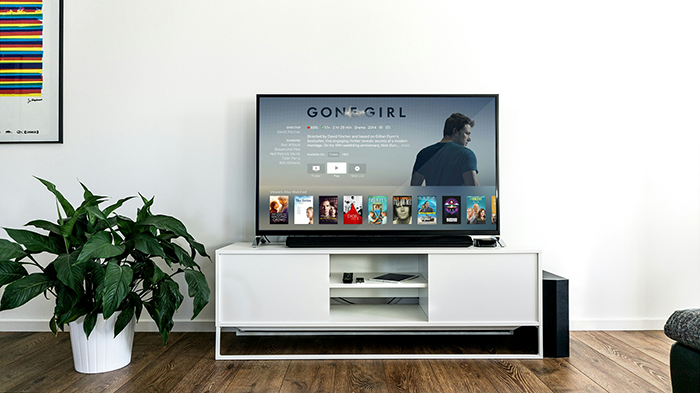
TCL is a global leader in television manufacturing. With new models being released every year, TCL needed a partner to help ensure their new products worked flawlessly in unique environments in real homes around the world. BetaTesting helped power a robust In-Home Usage Testing program to uncover bugs and technical issues, and collect user experience feedback to understand what real users like and dislike about their products.
Televisions manufactured for different geographic markets often have very different technology needs, including cutting edge hardware, memory, graphics cards, and processors to provide the best picture, sound, and UI for customers. Additionally, each country has its own unique mix of cable providers, cable boxes, speakers, gaming systems, and other hardware that must be thoroughly tested and seamlessly integrated to provide high quality user experiences.
BetaTesting and TCL first worked together on a single test in the United States. The BetaTesting test experts worked hand-in-hand with the TCL team to design a thorough testing process on the BetaTesting platform, starting with recruiting and screening the right users and having them complete a series of specific tasks, instructions, and surveys during the month-long test.
First, BetaTesting designed screening surveys to find and select over 100 testers, focused on which streaming services they watched, and what external products they had connected to their TVs – such as soundbars, gaming devices, streaming boxes, and more. Participants were recruited through the existing BetaTesting community of 400,000 testers and supplemented with custom recruiting through partner networks.
TCLs Product and User Research teams worked closely with BetaTesting to design multiple test flows for testers to complete. After TVs were shipped to qualified and vetted testers, the test process included testing and recording the unboxing and first impressions of the TV, followed by specific tasks each week, such as connecting and testing all external devices, playing games, testing screencasting and other functionality from phones, and more.
Testers also collected log files from the TV and shared them via detailed bug reports, and completed in-depth surveys about each feature. In the end, TCL received hundreds of bug reports and a wide mix of quantitative and qualitative survey responses to improve their TVs before launch.
Following the success of the US Test, TCL began similar tests in Italy and France, and ran additional tests in the US – often expanding the test process over multiple months to continue collecting in-depth feedback about specific issues, advanced TV settings, external devices, and more.
TCL is now expanding the testing relationship with BetaTesting to begin testing in Asia, as well as continuing their testing in the US and Europe as new products are ready for launch.
The TCL hardware tests are a comprehensive testing process that underscores the robust capabilities of BetaTesting platform and managed services. The BetaTesting team coordinated with different departments and stakeholders within the TCL team, and the test design focused on everything from onboarding to back-end data collection. Finally, testers provided hundreds of bug reports and qualitative and quantitative data to make this test – and the new product launch – a success for TCL.
Learn about how BetaTesting can help your company launch better products with our beta testing platform and huge community of global testers.
-
MSCHF Runs Manual Load Tests with BetaTesting Before Viral Launches: Case Study
MSCHF (pronounced “mischief”) is an American art collective based in Brooklyn, New York, United States. MSCHF has produced a wide range of artworks, ranging from browser plugins to sneakers, physical products, social media channels

Goal:
MSCHF, a Brooklyn-based art collective and agency for brands, has a cult-like following that results in viral product launches – ranging from real-life products for sale to web apps designed to get reactions and build social currency.
For two of MSCHF’s recent product launches, the MSCHF team needed to load test their sites for usability, crashes, and stability before a public launch. Testing with real users required finding a mix of devices, operating systems, and browsers to identify bugs and other issues before. Launch.
The first product was a Robo-caller, described as an Anti-Robocalling Robocalling Super PAC. The product was similar to election style super PAC dialers that consumers are subjected to during election season, but designed to “Make robocalls to end robocalls”.
The 2nd product was an AI-generated bot to rate your attractiveness and match you with other users via chat. Both products were designed to poke fun at common social trends.
Results:
MSCHF turned to BetaTesting to help them recruit a wide range of people to test their products at the same time to understand load issues. BetaTesting recruited testers across a wide mix of demographics and device types, who agreed to join the test at the same time across the US.
Testers prepared for the test in advance by sharing device information and completing pre-test surveys, and were prepared to join the live test in the exact same time.
During the first live test, testers uploaded pictures to the AI bot, matched with other testers to chat online, and received feedback about their pictures. During the full hour, they were given specific tasks to upload different types of pictures and interact with different people and features across the site.
For the 2nd test, testers received phone calls throughout the hour, and reported feedback about the call clarity, frequency of calls, and more to help refine the super-PAC dialer product.
During the live tests for MSCHF, the team identified:
- Crashes and product stability issues across various browsers and devices
- Pain points related to the usability of each product
- User experience feedback about how fun, annoying, or engaging the product was to use.
Learn about how BetaTesting can help your company launch better products with our beta testing platform and huge community of global testers.
-
Osmo / Disney Launch Innovative Children’s Worksheet Product: Case Study
BetaTesting powered testing and research for an innovative children’s worksheet product, earning 10M+ downloads and a successful launch on Amazon.
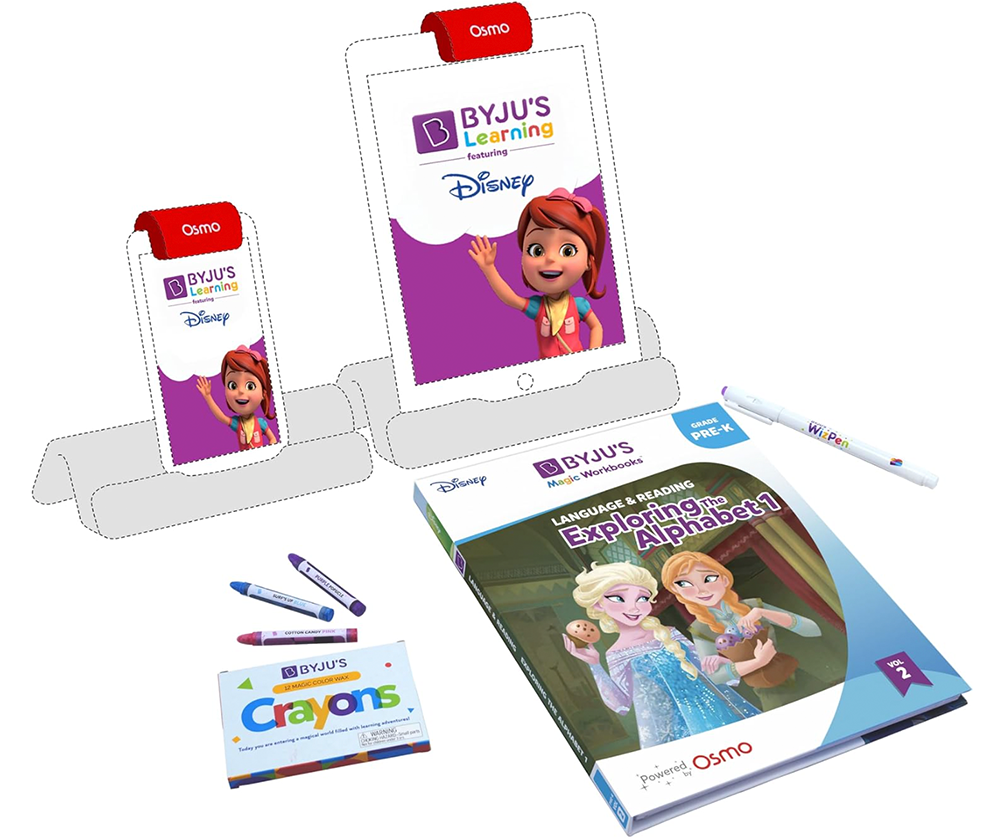
“Magic Worksheets featuring Disney were launched in the App/Play Store and on Amazon with dramatic success, earning a 4.7 / 5 stars on iOS and > 10M downloads on the Play Store”
Recent studies show that the educational games market is growing 20%+ per year, driven by the rise of e-learning during the pandemic, inexpensive global internet availability, and parents seeking engaging ways to teach their young children.
Disney has been a leader in this category for years, and has been able to make unique games based on their large library of intellectual property and characters that kids love. Osmo is an award-winning educational system for the iPad and Android tablets. Now the two companies have partnered together to create an innovative product combining the Osmo tablet with real-world worksheets powered by the Early Learn app (by Osmo parent company BYJU’s) along with engaging content and IP from Disney.
Osmo / BYJU’S first approached BetaTesting multiple years prior to the launch of the worksheet product. Already a staple in India, BYJU’S was interested in bringing their popular product to the US and further expanding globally. Initial testing was focused on testing the BYJU’s Early Learn app.
Initial Early Learn App Testing & User Research
The primary goal for the test was to connect with parents/children in the US to measure engagement data and collect feedback on the user experience and ethnocentric issues around the content and quizzes in the app. If there were any issues like confusing language or country-specific changes required (locations, metric system vs imperial system measurements, etc), it would be important to address those issues first.
Recruiting
The Early Learn team worked with BetaTesting to recruit the exact audience of testers they were looking for: Parents with 1st, 2nd, and 3rd graders with quotas for specific demographic targeting criteria – household income, languages spoken at home, learning challenges, and a geographic mix of regions across the US.
BetaTesting used its existing community of over 400,000+ testers, along with custom recruiting through our market research partners to find over 500 families interested in participating in the test. BetaTesting worked closely with the Early Learn user research team to design and execute the tests successfully.
Test Process & Results
Each child was asked to complete various “quests” in the app, which were educational journeys taken by their favorite characters. Each quest included videos, tutorials, and questions around age-appropriate modules, such as math, fractions, science, units of measurement, and more.
Children completed quests for over 3 weeks, and parents facilitated the collection of comprehensive feedback about the quality of the content, age appropriateness, and any parts of the user experience they found confusing or lacking in engagement.
The Early Learn team also collected in-depth feedback from parents about their opinions regarding technology, educational apps, and perceptions towards different educational approaches. The test helped the team develop insights into how different user personas approach their children’s education and how various factors impact parent’s decision-making regarding technology and educational usage and purchase behavior.
The feedback was overwhelmingly positive, and children seemed to love their favorite characters taking them on an educational quest. The Early Learn team also found dozens of bugs that needed to be fixed, and changes to the user experience and onboarding experience to make the games and quizzes easier and more enjoyable to play.
Ongoing User Feedback & QA Testing
After the initial test proved successful, BYJU’s continued to iteratively test and improve the app over 12+ months through the BetaTesting platform. Testing focused on both UX and QA: User experience tests were conducted with parents/children, while a more general pool of testers focused on QA testing through exploratory and functional “test-case driven” tests.
“The testing results have been very helpful to fix bugs and issues with the app, especially in cases where we need to replicate the real environment in the USA for the end user” – BYJU’s Beta Manager
Here are some examples of the types of tests run:
- Collect user experience feedback from parents/children as they engage with the app over 1 week – 4 weeks
- Ensure video-based content loaded quickly and played smoothly without skipping, logging bug reports to flag any specific videos or steps that caused issues
- Test the onboarding subscription workflow for free trials and paid subscriptions
- Complete specific quizzes at various grade levels to explore and report any bugs / issues
- Test content on WIFI or only on slower cellular coverage (3G / 4G)
- Testing on very specific devices in the real world (e.g. Samsung S22 Galaxy devices) to resolve issues related to specific end-user complaints
Testing continued on a wide range of real-world devices, including iPhones, Android phones, iPads, Android tablets, and Fire tablet devices, which are popular for families with young children.
Development and Testing for an innovative Worksheet product
As the Early Learn app neared readiness, another team at BYJU’s was responsible for the development and testing of an innovative new worksheet product. The product would combine the Osmo system with a new mode in the Early Learn app (worksheet mode) to allow children to complete real-life worksheets which were automatically scored and graded. Engaging characters provided tips and encouragement to provide an engaging environment for learning.
Initial testing for the Worksheets product included:
- Recruiting 50+ families with children spanning various grade levels (PreK, K, 1, 2, and 3).
- Coordinating and managing product shipment to each family
- Recording unboxing videos and the initial setup experience on video
- Daily / weekly feedback and bug reporting on engagement and technical issues
- Weekly surveys
Results:
Testing revealed that families loved the worksheets product, and children were captivated by the engaging learning environment. However, there were bugs and user experience issues to resolve related to setup, as many users were confused about how to set up the product and use it for the first time. There were also technical issues related to the accuracy of the camera, and correctly detecting and grading worksheets. Lastly, a percentage of the magic worksheet markers seemed to be damaged in shipment or simply not strong enough to draw lines that were readable by the camera.
All these issues were addressed and improved through subsequent iterative testing cycles. Additional tests also included the following:
- Tests to capture the entire end-user experience, from reviewing product details online (e.g. on Amazon), purchasing the product, and receiving it in the mail.
- Tests with premium users that opted into the paid subscription.
- Continued QA and UX testing with targeted groups of real-world users.
Ongoing testing revealed that the product was ready to launch, and the launch was a massive success.
Learn about how BetaTesting can help your company launch better products with our beta testing platform and huge community of global testers.
-
100+ criteria for beta tester recruiting. Test anything, anywhere with your audience.

At BetaTesting, we’re happy to formally announce a huge upgrade to our participant targeting capabilities. We now offer 100+ criteria for targeting consumers and professionals for beta testing and user research.
Our new targeting criteria makes it easier than ever to recruit your audience for real-world testing at scale. Need 100 Apple Watch users to test your new driving companion app over the course of 3 weeks? No problem.
Here’s what you’ll learn in this article:
- How to recruit beta testers and user research participants using more than 100+ targeting criteria
- Learn about standard demographic targeting vs Advanced Targeting criteria
- How specific should I make my targeting criteria?
- How and when to use a custom screening survey for recruiting test participants
- How niche recruiting criteria impacts costs
- When custom incentives may be required
About the New Platform Functionality
Video overview of BetaTesting Recruiting functionality:
Check out our help video for an overview on using BetaTesting recruiting and screening functionality. Where can I learn about using the new targeting features? Check out our Help article Recruiting Participants with 100+ Targeting Criteria for details and a help video on exactly how you can use our new Advanced targeting criteria.
What are the different criteria we can target on? See this help article (same referenced above) for all of the specific criteria you can target on!
Do we have access to all the targeting functionality in our plan? We are providing ALL plans (including our Recruit / pay-as-you-go plan) access to our full recruiting criteria when planning tests targeting our audience of participants.
Does the targeting criteria impact costs? Normally it does not! But there are a few instances where costs can increase based on who you’re targeting. If you define targeting criteria that we define as “niche”, your costs will typically be 2X higher. Audiences are considered niche if there are fewer than 1,500 participants estimated to meet your targeting criteria. In those cases, it’s much more difficult to recruit, and that is reflected in pricing. Also, if you are targeting professionals by job function or other employment targeting, this is also considered “niche” targeting and costs 2X more. This is because it’s a more difficult audience to recruit (we’ve spent years building and vetting our audience!) and these audiences typically have higher salaries and require higher incentives to entice them to apply and participate.
How to recruit beta testers and user research participants using more than 100+ targeting criteria

At BetaTesting, we have curated a community of over 400,000 consumers and professionals around the world that love participating in user research and beta testing.
We allow for recruiting participants in a number of different ways:
Demographic targeting (Standard & Advanced)
Target on age, gender, income, education and many more. We offer standard targeting, and we recently added new features to allow for targeting 100+ criteria (lifestyle, product ownership, culture and language, and many more) using Advanced Targeting.
Standard targeting screenshot:

New Advanced Targeting criteria screenshot. You can expand each section to show all the various criteria and questions participants have answered through their profiles. Each section contains many different criteria.
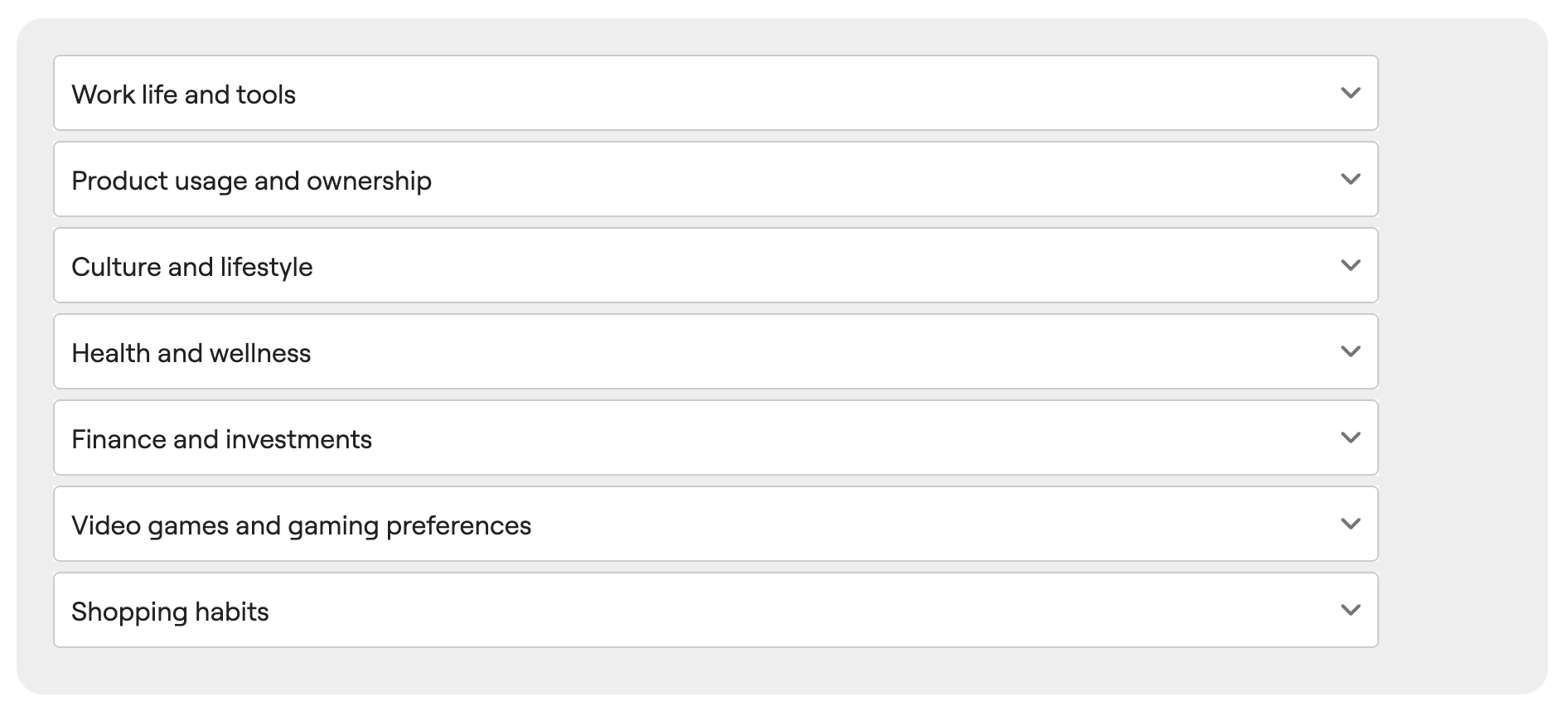
See expanded criteria for the Work Life and Tools section. Note, you can use the search bar to search for specific targeting options.

As you refine your targeting options, you’ll see an estimate on how many we have available in our audience:
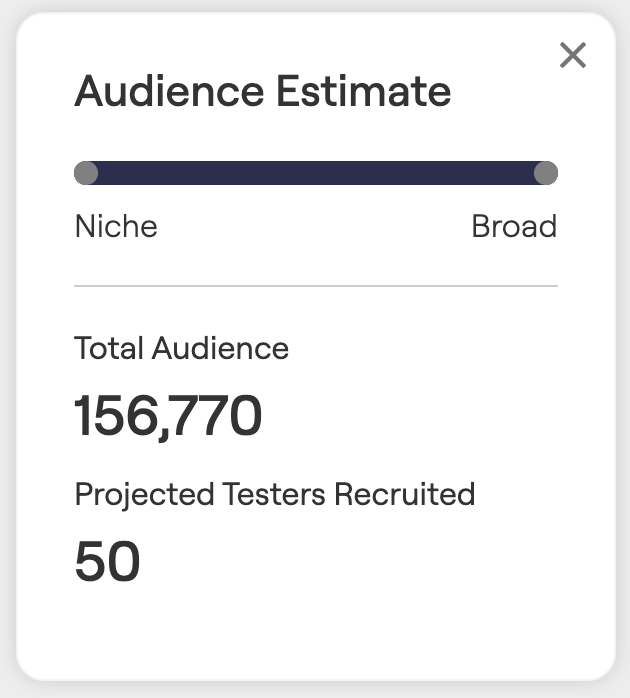
What is the difference between the Standard targeting and the Advanced targeting criteria?
The advanced targeting criteria includes a wide variety of expanded profile survey questions organized around various topics (e.g. Work Life, Product Usage and Ownership, Gaming preferences, etc). See above for some examples. The Advanced Criteria is part of a tester’s expanded profile that they can keep updated to provide more information about themselves to connect with targeting testing opportunities.
The standard criteria is part of every tester’s core profile on BetaTesting and includes basic demographic and device information.
In general, using the Advanced Criteria provides more fine-tuned targeting for your audience, in the cases there this is needed.
How specific should I make my targeting criteria?
We would recommend keeping your targeting and screening criteria as board as possible to recruit the audience you need. Think about the most important truly required criteria, and start there. Having a wider audience usually leads to more successful recruiting for several reasons:
- We can recruit from a wider pool of applicants, which means there are typically more available Top Testers within that pool of applicants. Generally this will lead to higher quality participants overall, because our system invites the best available participants first.
- The more niche the targeting requirements are, the longer recruiting can take
- More niche audiences typically require custom (higher) incentives (available through our Professional plans).
How and when to use a custom screening survey for recruiting test participants
A screening survey allows you to ask all applicants questions and only accept people that answer in a certain way. See this article to learn more about using a screening survey for recruiting user research and beta testing participants. You can learn about using Automatic or Manual participant acceptance.
There are a few times it makes sense to use a screening survey:
- If there are specific requirements for your test that are not available as one of the standard or advanced targeting criteria.
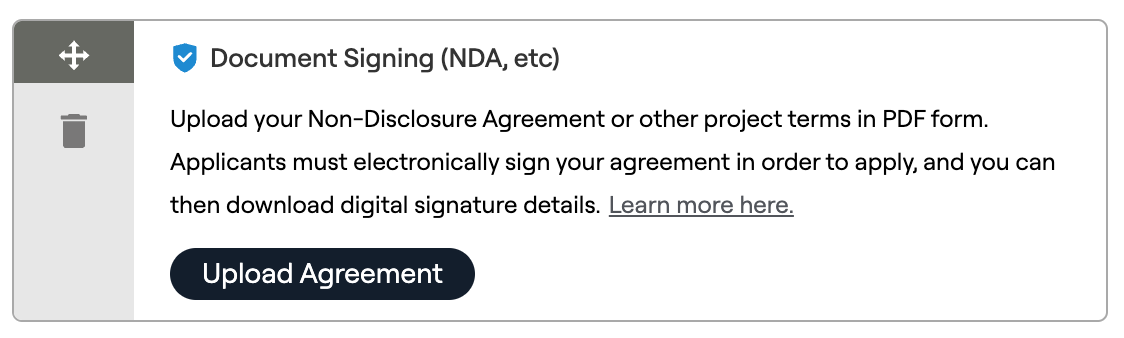
- If you need to collect emails upfront (e.g. for private beta testing). When you select this option in the test recruiting page, we’ll automatically add a screening question that collects each tester’s email. Once you accept each tester, you will have access to download their emails and invite them to your app.
- If you need to distribute an NDA or other test terms
- If you need to manually review applicants and select the right testers for your test, for example, if you are shipping a physical product out to users. In that case, you can use our Manual Screening options to collect open-text answers from applicants.


How niche recruiting criteria impacts costs
If your defined recruiting criteria is very specific, you may see that we estimate < 1,500 participants in our audience that match your criteria. In this case, we would consider the targeting “niche”. On our Recruit (pay as you go) plan, your per-tester pricing would then show as 2X the normal cost. You can always see the price defined as you change the criteria.

We also consider a test “niche” if you’re using the professional employment targeting options (e.g. job function).
In the case that your company has a Professional or Enterprise/Managed plan, you may have the ability to custom define the incentives that you offer to participants. In these cases, you’ll see a higher recommended incentive any time we notice that you may have niche targeting requirements.
When custom incentives may be required
There are a couple cases where it will be important to customize the incentive that you’re offering to participants:
- You are targeting a very niche audience (e.g. programmers) that have high incomes. In this case, you probably need to increase your incentive so your test is more appealing to your audience.
- You are planning a test with hundreds or thousands of participants.
In both those cases, we recommend getting in touch with our team and we can prepare a custom proposal for our Professional plan or higher. This plan will allow you to save money and to recruit the participants you need with custom incentives.
Have questions? Book a call in our call calendar.
-
How to Get 20 Testers & Pass Google’s New App Review Policy

At BetaTesting, we’re happy to announce our new pre-submission test type, designed to help developers recruit 20 testers for 2 weeks of app testing so you can pass the Google Play app store submission requirements with flying colors!
Check out our new Google Play 20 Tester Pre-Submission Beta Testing test type.
Here’s what you’ll learn in this article:
- How to recruit 20 targeted testers for your Google Play app
- How to get 2 consecutive weeks of testing
- How to collect survey feedback and bug reports to improve your app and pass the Google Play app submission requirements
- How to apply to publish your app in production on Google Play and how to answer questions to pass your app review!
About the New 20 Tester Google Policy
Where can I learn about this policy? Check out the new updated developer app submission requirements on Google Play. These are designed to improve the quality of apps within Google Play. Part of these requirements include app testing before submitting your app for review to the Google Play store. This is required for all new personal developer accounts, and recommended for all developers and organizations!
New requirements include the following:
- Personal developer accounts must first run a closed test for your app with at least 20 testers who have opted in for 14 days or more before submitting your app for approval.
- After meeting this criteria, you can apply for production access on in the Play Console
- During the application process, you’ll be asked questions about your app and its testing process and production readiness. In this process, you can reference your testing process with BetaTesting to collect bugs and feedback.
How to recruit 20 testers for your Google Play app

At BetaTesting, we have a community of over 400,000 testers around the world, with roughly 200,000 available in the United States. We allow targeting in a wide variety of ways:
- Demographic targeting: Age, gender, income, education and many more.
- Device targeting: Target users on Android phones, Android tablets, and many more device platforms (iPhones, iPads, Windows, Mac, etc).
- Custom screening surveys: Ask questions to testers and only those that answer the right way will be accepted.
You can learn all about our tester recruiting here. Check out our testing package for Google Play 20 Tester Pre-Submission Beta Testing.
Collect emails and distribute your app for closed testing through the Google Play Console
Through our pre-submission test template, you can collect emails from test participants when they join your test. You can then view or download the list of applicants so you can easily distribute your app through the Google Play Console. When designing your test, we allow you to collect emails when choosing which platforms you’d like to distribute your app to:
Screenshot below:

How to get testers to engage for 2 consecutive weeks of testing
Through the BetaTesting platform, we have multi-week test options available, designed specifically to recruit and engage testers over multiple weeks.
We provide two options for setting up your test:
- Use our pre-designed template, which requires ZERO setup and can be launched within minutes.
- OR customize your test instructions and survey questions according to your app.
If you choose to customize your test design, you can build your own test workflow using our custom test builder:

Watch the video below to learn more about how multi-day testing on BetaTesting works:
Want to learn more about our pre-submission Google Play app testing?
How to get user feedback & bug reports to improve your app before submission
Through the BetaTesting platform, you can provide testers with tasks/instructions, get bug reports for technical issues, and collect feedback through a survey.
All your test results are available in real-time through the BetaTesting dashboard and can be viewed online, exported, and downloaded.
You can even link your bug reports to Jira or download them to a spreadsheet.

View & manage your bugs through two different views.
The bug management “Grid View”

The bug management “Detail View”

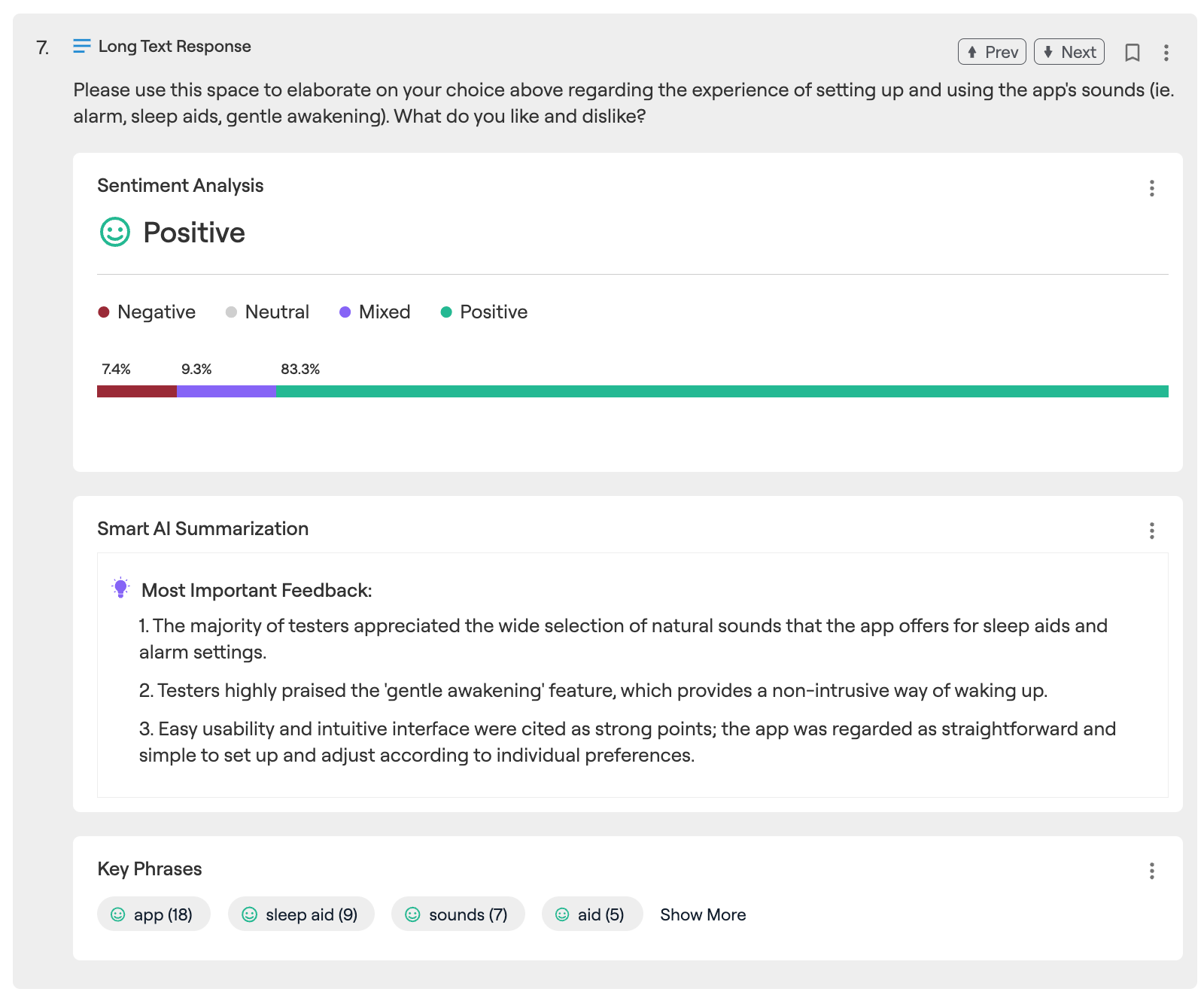
View survey results along with automated AI analysis to save you hours.
How to apply to publish your app in production on Google Play and how to answer questions to pass your app review!
When applying for access to Google Play Production, you’ll be asked the following questions:
Part 1: About your closed test
This section is used by Google to determine whether or not your app has met requirements to be tested before it is published on Google Play. The purpose is to allow Google to validate that your app is high quality and prevent low quality apps from being published in the Play Store. In this section, you should provide the following information:
- Provide information on how easy or difficult it was to recruit testers for your app. Hopefully, this was very easy for you if you used BetaTesting for your pre-submission test!
- Provide details about how testers engaged with your app. You can include details about any tasks or instructions you provided, and which features testers engaged with. As evidence for this section, you can also provide details on the bug reports you collected and resolved, and specific feedback and charts from your final feedback survey collected through BetaTesting. You can also indicate whether or not testers were able to engage with your app similarly to how a production user might in the real Play Store. With BetaTesting, we allow our testers to use your app organically over two weeks, so the types of usage and interactions should be close to (but even more rigorous) than normal app users.
- You’ll be asked to summarize the feedback you received from testers. This is a great spot to provide details from the various charts and feedback you received through your final feedback survey report. Common metrics to reference include your NPS score or star rating, and you can also share the automatically-generated AI summaries that summarize tester’s feedback for each question.
Part 2: About your app or game
This section is used by Google to understand a bit more about your app or game as part of their consideration during your app review process. You should provide the following info:
- Describe the intended use of your app or game and what type of user you are targeting. Be specific but also keep it short and sweet.
- Describe what makes your app or game stand out, and what value you provide to users. What is unique about your product and why will users use it? In this section, you can point to positive feedback you received during your beta test, and specifically reference answers to the questions in your feedback survey.
- Estimate how many installations you expect in the first year. Try to make the estimation reasonable, but don’t underestimate! However, with very high numbers, your app may receive a more strict review from Google given that they want to ensure your app is high quality if you expect so many people to install it.
Part 3: Production Readiness
This section is used to provide evidence that your app is ready for production. You should provide the following info:
- Describe the bugs you fixed during the testing period and any improvements you made to the app during the closed testing process.
- Describe why you are confident that your app is ready for production. Good examples would be positive feedback, a good NPS score, low number of new bug submissions (or validating that many key bugs have been resolved), or running multiple iterative tests over time and showing improvement.
Get in touch today to run your pre-submission test to ensure you pass the Google Play review!
Have questions? Book a call in our call calendar.
-
AI Video Analysis for Usability Videos

At BetaTesting, we’re happy to announce our AI video analysis tool, which saves you time and allows you to more easily understand key feedback within your usability videos.
The AI Video Analysis tool will be available for any test that includes video-based feedback, including Usability Videos, Selfie Videos, or Multi-Day longitudinal or beta tests with usability videos as part of the process.
Don’t have an account yet? Check out our plans and Sign up for free here.
Key AI features include:
- Automated transcriptions w/ timestamps
- Key topic detection, to automatically detect the key topics within the video and their associated sentiment.
- Video summary
- Sentence sentiment
- Video overlays for sentence sentiment and key phrase sentiment
- Copy/share links to specific points of time in the video
Transcripts w/ Timestamps
Why it helps: Seamlessly navigate to the most important sections of your video without watching the whole thing!

As you play your video, you’ll see the transcript automatically move to the appropriate section (highlighted). You can click and instantly navigate to any section of the video.
Key Topics Detected
Why it helps: See the sentiment around key topics (automatically grouped by AI) that the user discussed in the video, and click to jump to clips within your video where the user is discussing a specific topic.

Every transcript includes AI-driven key phrase detection to detect the most important topics discussed in the usability video, and their associated overall sentiment. You can click on any of these topics, and the transcript will automatically be filtered to only show you the parts of the video that discuss that topic. You can also view every mention for that topic as an overlay in the video, along with the individual sentiment of that mention.
Video Summary
Why it helps: Get a summary of your video transcript driven by ChatGPT. This does a great job at distilling the key feedback within the transcript.

Every usability video analysis includes an AI summary generated by ChatGPT.
Sentence Sentiment
Why it helps: We save you time by pulling out the important moments automatically. See positive and negative feedback in the transcript or scan the video timeline to find all of these moments directly in the video.

We detect sentiment within the transcript and automatically highlight the most important positive and negative areas. You can also view the video timeline to see each of these moments in the video.
Video Overlays for Sentence Sentiment and Key Topic Sentiment
Why it helps: Just scan the video timeline to see every time a certain key phrase was mentioned, or all of the most important positive and negative moments in your video.

Just hover over your video to see all the most important positive and negative moments, and click to jump to that location. If you have a specific key topic phrase highlighted, you’ll see every mention for that topic and the associated sentiment for that specific mention in the video overlay- even if the tester used a different word. For example, if the testers says “it needs a lot of work” the analysis is smart enough to detect context and understand that you were speaking about the “app” and group this with the “app” key topic.
Copy / Share Links to Any Point in the Video
Why it helps: This makes it easy to share a link with your co-worker to the exact point in the video where the user is discussing a pain point or giving encouraging feedback!

This is awesome. How does it all work?
We integrate with the best AI language models like ChatGPT (among others) to automatically analyze feedback with the goal of making it easy to surface key insights and make sense of complex data.
Have feedback or questions? Let us know! We look forward to continue to build and improve great AI driven beta testing and user research functionality!
Don’t have an account yet? Check out our plans and Sign up for free here.
Have questions? Book a call in our call calendar.
-
How Sengled Beta Tested iOT Smart Lights in the Real World: Case Study

The smart light market is currently worth over $8.5 billion and is growing over 22% each year. With new products, apps, and integrations available every day, it is important for smart light manufacturers to create amazing customer experiences to get consumers to buy and repurchase bulbs.
So when Sengled needed to test a new smartbulb model prior to public release, it was important to select the right beta testing partner. Sengled turned to BetaTesting due to our ability to handle logistics, shipping, and multi-week tests with a community of targeted real-world users.
BetaTesting helped Sengled get their smartbulb in the hands of real-world testers to provide feedback on the user experience, bugs, and integrations with other devices.
Sengled bulbs were shipped to over 100 testers across the US, selected based on a series of screening criteria, such as their previous experience with IoT products and whether they had a Google Home or Amazon Alexa product in their homes. Testers agreed to test the bulbs for a month, and were guided through a series of tasks and surveys to collect their feedback each week.
First, testers were asked to share their feedback about the packaging, unboxing, and setup experience. This included installing the bulb and connecting it to wifi, and completing the setup process through the Sengled app.
Through this process, Sengled received valuable insights into several specific technical issues affecting customers during the setup process. At times, bulbs were not connecting to certain routers and wifi networks, and users were confused at certain points of the onboarding process.
Finding and correcting these issues before launch proved very valuable. Even one or two small improvements early in the setup process can lead to significant decreases in returns and support costs, and increases in customer satisfaction when the product is live.
“The BetaTesting team and their beta testers have passion in new products, and were willing to work with our special requests. We’ve been very fortunate to work with this group. And certainly hope to work with Beta Testing group in the future.” said Sengled Product Manager Robert Tang.
As the month-long test continued, Sengled’s team worked with BetaTesting to design new surveys to test various features of the app and bulb: dimming, power reset, creating schedules and scenes, and more. Sengled was able to collect qualitative and quantitative feedback about which features used loved, where there was confusion in the app’s user flow, and much more.
For example, one important feature that was tested was the voice control option through Google Home and Amazon Alexa. Sengled was able to collect hundreds of voice commands and feedback from testers about the voice control experience, and which phrases Google or Alexa understood.
I asked Google home to “turn on living room light on” and it worked every time. I asked google to “turn living rooms lights off” and it worked every time. I asked google to “Turn Living room light bulb brightness to 50%” and it worked every time. The only command I could not get to work was to set a schedule using voice commands. I tried all kinds of variations like “hey Google set living room light to come on at 7pm” or “hey Google can I set a schedule for living room lights?” The most common answer Google would give would was “I am sorry I can not do that yet”. – Dave Oz Through the BetaTesting summary reports, Sengled received segmented analysis of Google users versus Amazon users, and how each group perceived the product after using voice commands in their home for weeks.
Sengled also received over 60 bug reports during the test, detailing issues related to connectivity, creating an account, app design, bulbs not working correctly, and much more. Each bug report included the device and operating system of the tester, and many had photos and videos to make it easy to understand the issue and let Sengled’s development team address them quickly.
Sengled found that the new features they had created for this product, such as the ability to setup light schedules and use voice controls, were extremely popular with users. The net promoter scores for the product were very high and Sengled received a range of feedback to continue improving their bulbs for the future.
Learn about how BetaTesting can help your company launch better products with our beta testing platform and huge community of global testers.
-
McAfee + BetaTesting Partner to Beta Test a New Antivirus Product for PC Gamers
Recent studies show that the gaming industry is expected to grow 12% per year from 2020-2025, with North America being the fastest growing market. This is driven by the rise of new gaming and technology platforms, readily available and cheap internet access across the globe, and the advent of new technology like augmented reality.
McAfee, the market leader in antivirus software, wanted to develop a new product focused on the unique security needs of gamers. Gamers have very different technology needs in comparison to other consumer groups. Their gaming systems are often complex, and include cutting edge hardware, memory, graphics cards, and processors to give them a leg up during gaming. Gamers demand high performance, and “high performance” is not typically a phrase used to describe antivirus software, known traditionally as being bulky and slow.
“We were in the need of a unique audience to satisfy the needs of the gamer security product, and BetaTesting did a great job in finding the right cohorts at the intended scale,” said Rajeshwar Sharma, Quality Leader at McAfee.
McAfee set out to develop an antivirus product that could provide maximum protection without affecting gameplay for this market. The McAfee team worked with BetaTesting to design a multi-month beta test before the Gamer Security product launched, for the purpose of collecting user experience feedback and functional/exploratory bug testing over multiple test cycles.
First, BetaTesting recruited over 400 PC gamers matching specific demographic and interest criteria required by McAfee: A unique mix of real-world operating systems, devices, and locations. Participants were recruited through the existing BetaTesting community of 250,000 testers and supplemented with custom recruiting through BetaTesting market research partner networks.
McAfee’s product team and user research teams worked closely with BetaTesting to design multiple test flows and collect feedback from hundreds of gamers. The test included feedback around the installation process, the user interface, and the back-end telemetry data of the antivirus product being used in the real-world.
Testers also provided information about which games they played, their hardware configurations, operating systems, and more, in order to connect all of that data to the performance of the Gamer Security product.
During the final rounds of testing, McAfee also provided marketing materials and screenshots to testers to get feedback about their messaging and content to see what resonated best with their target market.
The research team also set up moderated interviews with testers who had provided the most insightful feedback. Testers connected via video chat with the McAfee team to discuss their in-depth opinions about the product, their willingness to pay, and much more.
Overall, the test helped McAfee understand the value of the product to their target market. The feedback was overwhelmingly positive about how the antivirus software didn’t affect gameplay, and testers loved the simple installation, straightforward UI and performance data. The McAfee team was able to launch the product on time – with good reviews online.
“BetaTesting is an amazing team, who were very helpful, diligent and thorough from immediately understanding the requirements of our unique software to contract negotiations, and to overall execution of the program to the scale of our expectations. They were available, prompt and clear in all communications. I would highly recommend them!” – Rajeshwar Sharma, Quality Leader at McAfee.
McAfee received over 200 bug reports during the test, detailing issues related to installation and update issues, crashes, performance issues during certain games, data mismatches, and more. Each bug report included the device and operating system of the tester, and many had photos and videos to make it easy to understand the issue and let McAfee’s development team address them quickly.
The McAfee Gamer Security test was a comprehensive test that underscores the capabilities of BetaTesting platform and managed services. The BetaTesting team coordinated with different departments and stakeholders within the McAfee team, and the test design focused on everything from onboarding to back-end data collection to marketing content. Finally, testers provided hundreds of bug reports, qualitative and quantitative data, and moderated interview feedback to make this test – and the new product launch – a success for McAfee.
Learn about how BetaTesting can help your company launch better products with our beta testing platform and huge community of global testers.
-
Test Anything! See some recent examples of our beta tests.
We’ve run a lot of tests recently across a wide range of industries and products, and wanted to share some of them to highlight how you can test anything with our platform and community:
📺 a streaming media device with testers across the US
📱 a small business CRM and business phone line app for freelancers and business owners
📷 a drone + camera with automated tracking for existing power users
🎮 a new game on Steam with hundreds of players worldwide
👶🏼 an iOS app to help kids with speech therapy
🛡 a desktop antivirus product designed for gamers
🔒 a desktop VPN product tested in 10 different countries for usability and security
💵 an online web app for a business funding and lending platform
🚗 a machine learning app crowdsourced tester data to track travel behavior
… and many more.
We’d love to help you collect feedback fast and improve your products. Get in touch with our team and we’ll help you design your first test.

 BetaTesting Blog