-
Recruiting Humans for RLHF (Reinforcement Learning from Human Feedback)

Reinforcement Learning from Human Feedback (RLHF) has emerged as a pivotal technique for aligning AI systems, especially generative AI models like large language models (LLMs) with human expectations and values. By incorporating human preferences into the training loop, RLHF helps AI produce outputs that are more helpful, safe, and contextually appropriate.
This article provides a deep dive into RLHF: what it is, its benefits and limitations, when and how it fits into an AI product’s development, the tools used to implement it, and strategies for recruiting human participants to provide the critical feedback that drives RLHF. In particular, we will highlight why effective human recruitment (and platforms like BetaTesting) is crucial for RLHF success.
Here’s what we will explore:
- What is RLHF?
- Benefits of RLHF
- Limitations of RLHF
- When Does RLHF Occur in the AI Development Timeline?
- Tools Used for RLHF
- How to Recruit Humans for RLHF
What is RLHF?
Reinforcement learning from human feedback (RLHF) is a machine learning technique in which a “reward model” is trained with direct human feedback, then used to optimize the performance of an artificial intelligence agent through reinforcement learning – IBM
In essence, humans guide the AI by indicating which outputs are preferable, and the AI learns to produce more of those preferred outputs. This method is especially useful for tasks where the notion of “correct” output is complex or subjective.
For example, it would be impractical (or even impossible) for an algorithmic solution to define ‘funny’ in mathematical terms – but easy for humans to rate jokes generated by a large language model (LLM). That human feedback, distilled into a reward function, could then be used to improve the LLM’s joke writing abilities. In such cases, RLHF allows us to capture human notions of quality (like humor, helpfulness, or style) which are hard to encode in explicit rules.
Originally demonstrated on control tasks (like training agents to play games), RLHF gained prominence in the realm of LLMs through OpenAI’s research. Notably, the InstructGPT model was fine-tuned with human feedback to better follow user instructions, outperforming its predecessor GPT-3 in both usefulness and safety.
This technique was also key to training ChatGPT – “when developing ChatGPT, OpenAI applies RLHF to the GPT model to produce the responses users want. Otherwise, ChatGPT may not be able to answer more complex questions and adapt to human preferences the way it does today.” In summary, RLHF is a method to align AI behavior with human preferences by having people directly teach the model what we consider good or bad outputs.
Check it out: We have a full article on AI Product Validation With Beta Testing
Benefits of RLHF

Incorporating human feedback into AI training brings several important benefits, especially for generative AI systems:
- Aligns output with human expectations and values: By training on human preferences, AI models become “cognizant of what’s acceptable and ethical human behavior” and can be corrected when they produce inappropriate or undesired outputs.
In practice, RLHF helps align models with human values and user intent. For instance, a chatbot fine-tuned with RLHF is more likely to understand what a user really wants and stick within acceptable norms, rather than giving a literal or out-of-touch answer. - Produces less harmful or dangerous output: RLHF is a key technique for steering AI away from toxic or unsafe responses. Human evaluators can penalize outputs that are offensive, unsafe, or factually wrong, which trains the model to avoid them.
As a result, RLHF-trained models like InstructGPT and ChatGPT generate far fewer hateful, violent, or otherwise harmful responses compared to uninstructed models. This fosters greater trust in AI assistants by reducing undesirable outputs. - More engaging and context-aware interactions: Models tuned with human feedback provide responses that feel more natural, relevant, and contextually appropriate. Human raters often reward outputs that are coherent, helpful, or interesting.
OpenAI reported that RLHF-tuned models followed instructions better, maintained factual accuracy, and avoided nonsense or “hallucinations” much more than earlier models. In practice, this means an RLHF-enhanced AI can hold more engaging conversations, remember context, and respond in ways that users find satisfying and useful. - Ability to perform complex tasks aligned with human understanding: RLHF can unlock a model’s capability to handle nuanced or difficult tasks by teaching it the “right” approach as judged by people. For example, humans can train an AI to summarize text in a way that captures the important points, or to write code that actually works, by giving feedback on attempts.
This human-guided optimization enables LLMs with lesser parameters to perform better on challenging queries. OpenAI noted that its labelers preferred outputs from the 1.3B-parameter version of InstructGPT over even outputs from the 175B-parameter version of GPT-3. – showing that targeted human feedback can beat brute-force scale in certain tasks.
Overall, RLHF allows AI to tackle complex, open-ended tasks in ways that align with what humans consider correct or high-quality.
Limitations of RLHF
Despite its successes, RLHF also comes with notable challenges and limitations:
- Expensive and resource-intensive: Obtaining high-quality human preference data is costly and does not easily scale. Human preference data is expensive. The need to gather firsthand human input can create a costly bottleneck that limits the scalability of the RLHF process.
Training even a single model can require thousands of human feedback judgments, and employing experts or large crowds of annotators can drive up costs. This is one reason companies are researching partial automation of the feedback process (for example, AI-generated feedback as a supplement) to reduce reliance on humans. - Subjective and inconsistent feedback: Human opinions on what constitutes a “good” output can vary widely.
“Human input is highly subjective. It’s difficult, if not impossible, to establish firm consensus on what constitutes ‘high-quality’ output, as human annotators will often disagree… on what ‘appropriate’ model behavior should mean.”
In other words, there may be no single ground truth for the model to learn, and feedback can be noisy or contradictory. This subjectivity makes it hard to perfectly optimize to “human preference,” since different people prefer different things. - Risk of bad actors or trolling: RLHF assumes feedback is provided in good faith, but that may not always hold. Poorly incentivized crowd workers might give random or low-effort answers, and malicious users might try to teach the model undesirable behaviors.
Researchers have even identified “troll” archetypes who give harmful or misleading feedback. Robust quality controls and careful participant recruitment are needed to mitigate this issue (more on this in the recruitment section below). - Bias and overfitting to annotators: An RLHF-tuned model will reflect the perspectives and biases of those who provided the feedback. If the pool of human raters is narrow or unrepresentative, the model can become skewed.
For example, a model tuned only on Western annotators’ preferences might perform poorly for users from other cultures. It’s essential to use diverse and well-balanced feedback sources to avoid baking in bias.
In summary, RLHF improves AI alignment but is not a silver bullet – it demands significant human effort, good experimental design, and continuous vigilance to ensure the feedback leads to better, not worse, outcomes.
When Does RLHF Occur in the AI Development Timeline?

RLHF is typically applied after a base AI model has been built, as a fine-tuning and optimization stage in the AI product development lifecycle. By the time you’re using RLHF, you usually have a pre-trained model that’s already learned from large-scale data; RLHF then adapts this model to better meet human expectations.
The RLHF pipeline for training a large language model usually involves multiple phases:
- Supervised fine-tuning of a pre-trained model: Before introducing reinforcement learning, it’s common to perform supervised fine-tuning (SFT) on the model using example prompts and ideal responses.
This step “primes” the model with the format and style of responses we want. For instance, human trainers might provide high-quality answers to a variety of prompts (Q&A, writing tasks, etc.), and the model is tuned to imitate these answers.
SFT essentially “‘unlocks’ capabilities that GPT-3 already had, but were difficult to elicit through prompt engineering alone. In other words, it teaches the model how it should respond to users before we start reinforcement learning. - Reward model training (human preference modeling): Next, we collect human feedback on the model’s outputs to train a reward model. This usually involves showing human evaluators different model responses and having them rank or score which responses are better.
For example, given a prompt, the model might generate multiple answers; humans might prefer Answer B over Answer A, etc. These comparisons are used to train a separate neural network – the reward model – that takes an output and predicts a reward score (how favorable the output is).
Designing this reward model is tricky because asking humans to give absolute scores is hard; using pairwise comparisons and then mathematically normalizing them into a single scalar reward has proven effective. The reward model effectively captures the learned human preferences. - Policy optimization via reinforcement learning: In the final phase, the original model (often called the “policy” in RL terms) is further fine-tuned using reinforcement learning algorithms, with the reward model providing the feedback signal.
A popular choice is Proximal Policy Optimization (PPO), which OpenAI used for InstructGPT and ChatGPT. The model generates outputs, the reward model scores them, and the model’s weights are adjusted to maximize the reward. Care is taken to keep the model from deviating too much from its pre-trained knowledge (PPO includes techniques to prevent the model from “gaming” the reward by producing gibberish that the reward model happens to score highly.
Through many training iterations, this policy optimization step trains the model to produce answers that humans (as approximated by the reward model) would rate highly. After this step, we have a final model that hopefully aligns much better with human-desired outputs.
It’s worth noting that pre-training (the initial training on a broad dataset) is by far the most resource-intensive part of developing an LLM. The RLHF fine-tuning stages above are relatively lightweight in comparison – for example, OpenAI reported that the RLHF process for InstructGPT used <2% of the compute that was used to pre-train GPT-3.
RLHF is a way to get significant alignment improvements without needing to train a model from scratch or use orders of magnitude more data; it leverages a strong pre-trained foundation and refines it with targeted human knowledge.
Check it out: Top 10 AI Terms Startups Need to Know
Tools Used for RLHF
Implementing RLHF for AI models requires a combination of software frameworks, data collection tools, and evaluation methods, as well as platforms to source the human feedback providers. Key categories of tools include:
Participant recruitment platforms: A crucial “tool” for RLHF is the source of human feedback providers. You need humans (often lots of them) to supply the preferences, rankings, and demonstrations that drive the whole process. This is where recruitment platforms come in (discussed in detail in the next section).
In brief, some options include crowdsourcing marketplaces like Amazon Mechanical Turk, specialized AI data communities, or beta testing platforms to get real end-users involved. The quality of the human feedback is paramount, so choosing the right recruitment approach (and platform) significantly impacts RLHF outcomes.
BetaTesting is a platform with a large community of vetted, real-world testers that can be tapped for collecting AI training data and feedback at scale
Other services like Pareto or Surge AI maintain expert labeler networks to provide high-accuracy RLHF annotations, while platforms like Prolific recruit diverse participants who are known for providing attentive and honest responses. Each has its pros and cons, which we’ll explore below.
RLHF training frameworks and libraries: Specialized libraries help researchers train models with RLHF algorithms. For example, Hugging Face’s TRL (Transformer Reinforcement Learning) library provides “a set of tools to train transformer language models” with methods like supervised fine-tuning, reward modeling, and PPO/other optimization algorithms.
Open-source frameworks such as DeepSpeed-Chat (by Microsoft), ColossalChat (by Colossal AI), and newer projects like OpenRLHF have emerged to facilitate RLHF at scale. These frameworks handle the complex “four-model” setup (policy, reward model, reference model, optimizer) and help with scaling to large model sizes. In practice, teams leveraging RLHF often start with an existing library rather than coding the RL loop from scratch.
Data labeling & annotation tools: Since RLHF involves collecting a lot of human feedback data (e.g. comparisons, ratings, corrections), robust annotation tools are essential. General-purpose data labeling platforms like Label Studio and Encord now offer templates or workflows specifically for collecting human preference data for RLHF. These tools provide interfaces for showing prompts and model outputs to human annotators and recording their judgments.
Many organizations also partner with data service providers: for instance, Appen (a data annotation company) has an RLHF service that leverages a carefully curated crowd of diverse human annotators with domain expertise to supply high-quality feedback. Likewise, Scale AI offers an RLHF platform with an intuitive interface and collaboration features to streamline the feedback process for labelers.
Such platforms often come with built-in quality control (consistency checks, gold standard evaluations) to ensure the human data is reliable.
Evaluation tools and benchmarks: After fine-tuning a model with RLHF, it’s critical to evaluate how much alignment and performance have improved. This is done through a mix of automated benchmarks and further human evaluation.
A notable tool is OpenAI Evals, an open-source framework for automated evaluation of LLMs. Developers can define custom evaluation scripts or use community-contributed evals (covering things like factual accuracy, reasoning puzzles, harmlessness tests, etc.) to systematically compare their RLHF-trained model against baseline models. Besides automated tests, one might run side-by-side user studies: present users with responses from the new model vs. the old model or a competitor, and ask which they prefer.
OpenAI’s launch of GPT-4, for example, reported that RLHF doubled the model’s accuracy on challenging “adversarial” questions – a result discovered through extensive evaluation. Teams also monitor whether the model avoids the undesirable outputs it was trained against (for instance, testing with provocative prompts to see if the model stays polite and safe).
In summary, evaluation tools for RLHF range from code-based benchmarking suites to conducting controlled beta tests with real people in order to validate that the human feedback truly made the model better.
How to Recruit Humans for RLHF
Obtaining the “human” in the loop for RLHF can be challenging – the task requires people who are thoughtful, diligent, and ideally somewhat knowledgeable about the context.
As one industry source notes,
“unlike typical data-labeling tasks, RLHF demands in-depth and honest feedback. The people giving that feedback need to be engaged, invested, and ready to put the time and effort into their answers.”
This means recruiting the right participants is crucial. Here are some common strategies for recruiting humans for RLHF projects, and how they stack up:
Internal recruitment (employees or existing users): One way to get reliable feedback is to recruit from within your organization or current user base. For example, a product team might have employees spend time testing a chatbot and providing feedback, or invite power-users of the product to give input.
The advantage is that these people often have domain expertise and a strong incentive to improve the AI. They might also understand the company’s values well (helpful for alignment). However, internal pools are limited in size and can introduce bias – employees might think alike, and loyal customers might not represent the broader population.
This approach works best in early stages or for niche tasks where only a subject-matter expert can evaluate the model. It’s essentially a “friends-and-family” beta test for your AI.
Social media, forums, and online communities: If you have an enthusiastic community or can tap into AI discussion forums, you may recruit volunteers. Announcing an “AI improvement program” on Reddit, Discord, or Twitter, for instance, can attract people interested in shaping AI behavior.
A notable example is the OpenAssistant project, which crowd-sourced AI assistant conversations from over 13,500 volunteers worldwide. These volunteers helped create a public dataset for RLHF, driven by interest in an open-source ChatGPT alternative. Community-driven recruitment can yield passionate contributors, but keep in mind the resulting group may skew towards tech-savvy or specific demographics (not fully representative).
Also, volunteers need motivation – many will do it for altruism or curiosity, but retention can be an issue without some reward or recognition. This approach can be excellent for open projects or research initiatives where budget is limited but community interest is high.
Paid advertising and outreach: Another route is to recruit strangers via targeted ads or outreach campaigns. For instance, if you need doctors to provide feedback for a medical AI, you might run LinkedIn or Facebook ads inviting healthcare professionals to participate in a paid study. Or more generally, ads can be used to direct people to sign-up pages to become AI model “testers.”
This method gives you control over participant criteria (through ad targeting) and can reach people outside existing platforms. However, it requires marketing effort and budget, and conversion rates can be low (not everyone who clicks an ad will follow through to do tedious feedback tasks). It’s often easier to leverage existing panels and platforms unless you need a very specific type of user that’s hard to find otherwise.
If using this approach, clarity in the ad (what the task is, why it matters, and that it’s paid or incentivized) will improve the quality of recruits by setting proper expectations.Participant recruitment platforms: In many cases, the most efficient solution is to use a platform specifically designed to find and manage participants for research or testing. Several such platforms are popular for RLHF and AI data collection:
- BetaTesting: is a user research and beta-testing platform with a large pool of over 450,000 vetted participants across various demographics, devices, and locations.
We specialize in helping companies collect feedback, bug reports, and “human-powered data for AI” from real-world users. The platform allows targeting by 100+ criteria (age, gender, tech expertise, etc.) and supports multi-day or iterative test campaigns.
For RLHF projects, BetaTesting can recruit a cohort of testers who interact with your AI (e.g., try prompts and rate responses) in a structured way. Because the participants are pre-vetted and the process is managed, you often get higher-quality feedback than a general crowd marketplace. BetaTesting’s focus on real user experience means participants tend to give more contextual and qualitative feedback, which can enrich RLHF training (for instance, explaining why a response was bad, not just rating it).
In practice, BetaTesting is an excellent choice when you want high-quality, diverse feedback at scale without having to build your own community from scratch – the platform provides the people and the infrastructure to gather their input efficiently.
- Pareto (AI): is a service that offers expert data annotators on demand for AI projects, positioning itself as a premium solution for RLHF and other data needs. Their approach is more hands-on – they assemble a team of trained evaluators for your project and manage the process closely.
Pareto emphasizes speed and quality, boasting “expert-vetted data labelers” and “industry-leading accuracy” in fine-tuning LLMs. Clients define the project and Pareto’s team executes it, including developing guidelines and conducting rigorous quality assurance. This is akin to outsourcing the human feedback loop to professionals.
It can be a great option if you have the budget and need very high-quality, domain-specific feedback (for example, fine-tuning a model in finance or law with specialists, ensuring consistent and knowledgeable ratings). The trade-off is cost and possibly less transparency or control compared to running a crowdsourced approach. For many startups or labs, Pareto might be used on critical alignment tasks where errors are costly.
- Prolific: is an online research participant platform initially popular in academic research, now also used for AI data collection. Prolific maintains a pool of 200,000+ active participants who are pre-screened and vetted for quality and ethics. Researchers can easily set up studies and surveys, and Prolific handles recruiting participants that meet the study’s criteria.
For RLHF, Prolific has highlighted its capability to provide “a diverse pool of participants who give high-quality feedback on AI models” – the platform even advertises use cases like tuning AI with human feedback. The key strengths of Prolific are data quality and participant diversity. Studies (and Prolific’s own messaging) note that Prolific respondents tend to pay more attention and give more honest, detailed answers than some other crowdsourcing pools.
The platform also makes it easy to integrate with external tasks: you can, for example, host an interface where users chat with your model and rate it, and simply give Prolific participants the link. If your RLHF task requires thoughtful responses (e.g., writing a few sentences explaining preferences) and you want reliable people, Prolific is a strong choice.
The costs are higher per participant than Mechanical Turk, but you often get what you pay for in terms of quality. Prolific also ensures participants are treated and paid fairly, which is ethically important for long-term projects.
- Amazon Mechanical Turk (MTurk): is one of the oldest and largest crowd-work platforms, offering access to a vast workforce to perform micro-tasks for modest pay. Many early AI projects (and some current ones) have used MTurk to gather training data and feedback.
On the plus side, MTurk can deliver fast results at scale – if you post a simple RLHF task (like “choose which of two responses is better” with clear instructions), you could get thousands of judgments within hours, given the size of the user base. It’s also relatively inexpensive per annotation. However, the quality control burden is higher: MTurk workers vary from excellent to careless, and without careful screening and validation you may get noisy data. For nuanced RLHF tasks that require reading long texts or understanding context, some MTurk workers may rush through just to earn quick money, which is problematic.
Best practices include inserting test questions (to catch random answers), requiring a qualification test, and paying sufficiently to encourage careful work. Scalability can also hit limits if your task is very complex – fewer Turkers might opt in.
It’s a powerful option for certain types of feedback (especially straightforward comparisons or binary acceptability votes) and has been used in notable RLHF implementations. But when ultimate quality and depth of feedback are paramount, many teams now prefer curated platforms like those above. MTurk remains a useful tool in the arsenal, particularly if used with proper safeguards and for well-defined labeling tasks.
Each recruitment method can be effective, and in fact many organizations use a combination. For example, you might start with internal experts to craft an initial reward model, then use a platform like BetaTesting to get a broader set of evaluators for scaling up, and finally run a public-facing beta with actual end-users to validate the aligned model in the wild. The key is to ensure that your human feedback providers are reliable, diverse, and engaged, because the quality of the AI’s alignment is only as good as the data it learns from.
No matter which recruitment strategy you choose, invest in training your participants and maintaining quality. Provide clear guidelines and examples of good vs. bad outputs. Consider starting with a pilot: have a small group do the RLHF task, review their feedback, and refine instructions before scaling up. Continuously monitor the feedback coming in – if some participants are giving random ratings, you may need to replace them or adjust incentives.
Remember that RLHF is an iterative, ongoing process (“reinforcement” learning is never really one-and-done). Having a reliable pool of humans to draw from – for initial training and for later model updates – can become a competitive advantage in developing aligned AI products.
Check it out: We have a full article on AI in User Research & Testing in 2025: The State of The Industry
Conclusion
RLHF is a powerful approach for making AI systems more aligned with human needs, but it depends critically on human collaboration. By understanding where RLHF fits into model development and leveraging the right tools and recruitment strategies, product teams and researchers can ensure their AI not only works, but works in a way people actually want.
With platforms like BetaTesting and others making it easier to harness human insights, even smaller teams can implement RLHF to train AI models that are safer, more useful, and more engaging for their users.
As AI continues to evolve, keeping humans in the loop through techniques like RLHF will be vital for building technology that genuinely serves and delights its human audience.
Have questions? Book a call in our call calendar.
-
AI Human Feedback: Improving AI Products with Human Feedback

Building successful AI-powered products isn’t just about clever algorithms – it’s also about engaging real users at every step. Human feedback acts as a guiding compass for AI models, ensuring they learn the right lessons and behave usefully.
In this article, we’ll explore when to collect human feedback in the AI development process, the types of feedback that matter, and how to gather and use that feedback effectively. This article is geared to product managers, user researchers, engineers, and entrepreneurs who can turn these ideas into action.
Here’s is what we will cover:
- When to Collect Human Feedback
- Types of Feedback for AI Products
- How to Collect Human Feedback for AI Products?
- Integrating Feedback into the User Experience Learning
- Leveraging Structured Feedback Platforms
When to Collect AI Human Feedback
AI products benefit from human input throughout their lifecycle. From the earliest data collection stages to long after launch, strategic feedback can make the difference between a failing AI and a product that truly delights users. Below are key phases when collecting human feedback is especially valuable:
During Training Data Curation
Early on, humans can help curate and generate the training data that AI models learn from. This can include collecting real user behavior data or annotating special datasets.
For example, a pet-tech company might need unique images to train a computer vision model. In one case, Iams worked with BetaTesting to gather high-quality photos and videos of dog nose prints from a wide range of breeds and lighting scenarios. This data helped improve the accuracy of their AI-powered pet identification app designed to reunite lost dogs with their owners.
By recruiting the right people to supply or label data (like those dog nose images), the training dataset becomes richer and more relevant. Human curation and annotation at this stage ensures the model starts learning from accurate examples rather than raw, unvetted data provided by non-experts.
During Model Evaluation
Once an AI model is trained, we need to know how well it actually works for real users. Automated metrics (accuracy, loss, etc.) only tell part of the story. Human evaluators are crucial for judging subjective qualities like usefulness, clarity, or bias in model outputs. As one research paper puts it,
“Human evaluation is indispensable and inevitable for assessing the quality of texts generated by machine learning models or written by humans.”
In practice, this might mean having people rate chatbot answers for correctness and tone, or run usability tests on an AI feature to see if it meets user needs. Human input during evaluation catches issues that pure metrics miss – for instance, an image recognition model might score well in lab tests but could still output results that are obviously irrelevant or offensive to users.
By involving actual people to review and score the AI’s performance, product teams can identify these shortcomings. The model can then be adjusted before it reaches a wider audience.
During Model Fine-Tuning
Initial training often isn’t the end of teaching an AI. Fine-tuning with human feedback can align a model with what users prefer or expect. A prominent technique is Reinforcement Learning from Human Feedback (RLHF), where human preferences directly shape the model’s behavior. The primary advantage of the RLHF approach is that it “capture[s] nuance and subjectivity by using positive human feedback in lieu of formally defined objectives.”
In other words, people can tell the AI what’s a “good” or “bad” output in complex situations where there’s no simple right answer. For example, fine-tuning a language model with RLHF might involve showing it several responses to a user query and having human reviewers rank them. The model learns from these rankings to generate more preferred answers over time.
This stage is key for aligning AI with human values, polishing its manners, and reducing harmful outputs. Even supervised fine-tuning (having humans provide the correct responses for the model to mimic) is a form of guided improvement based on human insight.
For Pre-Launch User Testing
Before rolling out an AI-driven product or feature publicly, it’s wise to get feedback from a controlled group of humans. Beta tests, pilot programs, or “trusted tester” groups allow you to see how the AI performs with real users in realistic scenarios – and gather their impressions. This kind of early feedback can prevent public debacles.
Recall when Google hastily demoed its Bard chatbot and it made a factual error? They quickly emphasized a phased testing approach after that misstep.
“This highlights the importance of a rigorous testing process… We’ll combine external feedback with our own internal testing to make sure Bard’s responses meet a high bar for quality, safety and groundedness in real-world information.” – Jane Park, Google spokesperson
The idea is to catch problems early – be it model errors or UI confusion – by having humans use the AI in a beta context. Pre-launch feedback helps teams address any issues of accuracy, fairness, or usability before wider release, ultimately saving the product from negative user reactions and press.
For Ongoing Feedback in Production
Human feedback shouldn’t stop once the product is live. In production, continuous feedback loops help the AI stay effective and responsive to user needs. Real users will inevitably push the AI into new territory or encounter edge cases. By giving them easy ways to provide feedback, you can catch issues and iterate.
For instance, many AI chat services have a thumbs-up/down or “Was this helpful?” prompt after answers – these signals go back into improving the model over time. Similarly, usage analytics can reveal where users get frustrated (e.g. repeating a query or abandoning a conversation). Even without explicit input, monitoring implicit signals (more on that below) like the length of user sessions or dropout rates can hint at satisfaction levels.
The key is treating an AI product as a continually learning system: using live feedback data to fix issues, update training, or roll out improvements. Ongoing human feedback ensures the AI doesn’t grow stale or drift away from what users actually want, long after launch day.
Check it out: We have a full article on AI Product Validation With Beta Testing
Types of Feedback for AI Products

Not all feedback is alike – it comes in different forms, each offering unique insights. AI product teams should think broadly about what counts as “feedback,” from a star rating to a silent pause. Below are several types of feedback that can inform AI systems:
Task Success Rate: At the end of the day, one of the most telling measures of an AI product’s effectiveness is whether users can achieve their goals with it. In user experience terms, this is often called task success or completion rate. Did the user accomplish what they set out to do with the help of the AI? For instance, if the AI is a scheduling assistant, did it successfully book a meeting for the user? If it’s a medical symptom checker, did the user get appropriate advice or a doctor’s appointment?
Tracking task success may require defining what a “successful outcome” is for your specific product and possibly asking the user (an explicit post-task survey: “Were you able to do X?”). It can also be inferred in some cases (if the next action after using the AI is the user calling support, perhaps the AI failed). According to usability experts, “success rates are easy to collect and a very telling statistic. After all, if users can’t accomplish their target task, all else is irrelevant. As quoted in this article from NN/g, User success is the bottom line of usability. . In other words, fancy features and high engagement mean little if the AI isn’t actually helping users get stuff done.
Thus, measuring task success (e.g. percentage of conversations where the user’s question was answered to their satisfaction, or percentage of AI-driven e-commerce searches that ended in a purchase) provides concrete feedback on the AI’s utility. Low success rates flag a need to improve the AI’s capabilities or the product flow around it. High success rates, especially paired with positive qualitative feedback, are strong validation that the AI is meeting user needs.
Explicit vs. Implicit Feedback: These are two fundamental categories:
Explicit feedback refers to direct, intentional user input – like ratings, reviews, or survey responses – where users explicitly state preferences.
Implicit feedback, on the other hand, is inferred from user actions, such as clicks, purchase history, or time spent viewing content.
In short, explicit feedback is an intentional signal (for example, a user gives a chatbot answer 4 out of 5 stars or writes “This was helpful”), whereas implicit feedback is gathered by observing user behavior (for example, the user keeps using the chatbot for 10 minutes, which implies it was engaging). Both types are valuable.
Explicit feedback is precise but often sparse (not everyone rates or comments), while implicit feedback is abundant but must be interpreted carefully. A classic implicit signal is how a user interacts with content: Platforms like YouTube or Netflix monitor which videos users start, skip, or rewatch. If a user watches 90% of a movie, this strongly suggests they enjoyed it, while abandoning a video after 2 minutes might indicate disinterest. Here, the length of engagement (90% vs. 2 minutes) is taken as feedback about content quality or relevance.
AI products should leverage both kinds of feedback – explicit when you can get it, and implicit gleaned from normal usage patterns.
Natural Language Feedback: Sometimes users will literally tell your AI what they think, in plain words. For example, a user might type to a chatbot, “That’s not what I asked for,” or say to a voice assistant, “No, that’s wrong.” This free-form feedback is gold. It’s explicit, but it’s not in the form of a structured rating – it’s in the user’s own words.
Natural language feedback can highlight misunderstandings (“I meant Paris, Texas, not Paris, France”), express frustration (“You’re not making sense”), or give suggestions (“Can you show me more options?”). Modern AI systems can be designed to parse such input: a chatbot could detect phrases like “not what I asked” as a signal it provided an irrelevant answer, triggering a corrective response or at least logging the incident for developers. Unlike hitting a thumbs-down button, verbal feedback often contains specifics about whythe user is dissatisfied or what they expected.
Capturing and analyzing these comments can guide both immediate fixes (e.g. the AI apologizes or tries again) and longer-term improvements (e.g. adjusting the model or content based on common complaints).
Indicators of User Disengagement: Not all feedback is explicit; often, inaction or avoidance is a feedback signal. If users stop interacting with your AI or opt out of using it, something might be wrong. For instance, in a chat interface, if the user suddenly stops responding or closes the app after the AI’s answer, that could indicate the answer wasn’t helpful or the user got frustrated.
High dropout rates at a certain step in an AI-driven onboarding flow signal a poor experience. Skipping behavior is another telltale sign: consider a music streaming service – if a listener consistently skips a song after a few seconds, it’s a strong implicit signal they don’t like it. Similarly, if users of a recommendation system frequently hit “next” or ignore certain suggestions, the AI may not be meeting their needs.
These disengagement cues (rapid skipping, closing the session, long periods of inactivity) serve as negative feedback that the AI or content isn’t satisfying. The challenge is interpreting them correctly. One user might leave because they got what they needed quickly (a good thing), whereas another leaves out of frustration. Context is key, but overall patterns of disengagement are a red flag that should feed back into product tweaks or model retraining.
Complaint Mechanisms: When an AI system does something really off-base – say it produces inappropriate content, makes a serious error, or crashes – users need a way to complain or flag the issue.
A well-designed AI product includes feedback channels for complaints, such as a “Report this result” link, an option to contact support, or forms to submit bug reports. These mechanisms gather crucial feedback on failures and harm. For example, a generative AI image app might include a button to report outputs that are violent or biased. Those reports alert the team to content that violates guidelines and also act as training data – the model can learn from what not to do. Complaint feedback is typically explicit (the user actively submits it) and often comes with high urgency.
It’s important to make complaining easy; if users can’t tell you something went wrong, you’ll never know to fix it. Moreover, having a complaint channel can make users feel heard and increase trust, even if they never use it. In the backend, every complaint or flagged output should be reviewed. Common issues might prompt an immediate patch or an update to the AI’s training. For instance, if multiple users of a language model flag responses as offensive, developers might refine the model’s filtering or training on sensitive topics.
Complaints are painful to get, but they’re direct feedback on the worst-case interactions – exactly the ones you want to minimize.
Features for Re-requests or Regeneration: Many AI products allow the user to say “Try again” in some fashion. Think of the “Regenerate response” feature in ChatGPT or a voice assistant saying, “Would you like me to rephrase that?” These features serve two purposes: they give users control to correct unsatisfactory outcomes, and they signal to the system that the last attempt missed the mark.
A user hitting the retry button is implicit feedback that the previous output wasn’t good enough. Some systems might even explicitly ask why: e.g., after hitting “Regenerate,” a prompt could appear like “What was wrong with the last answer?” to gather explicit feedback. Even without that, the act of re-requesting content helps developers see where the AI frequently fails. For example, if 30% of users are regenerating answers to a certain type of question, that’s a clear area for model improvement.
Similarly, an e-commerce recommendation carousel might have a “Show me more” button – if clicked often, it implies the initial recommendations weren’t satisfactory. Designing your AI interface to include safe fallbacks (retry, refine search, ask a human, etc.) both improves user experience and produces useful feedback data. Over time, you might analyze regenerate rates as a quality metric (lower is better) and track if changes to the AI reduce the need for users to ask twice.
User Sentiment and Emotional Cues: Humans express how they feel about an AI’s performance not just through words, but through tone of voice, facial expressions, and other cues. Advanced AI products, especially voice and vision interfaces, can attempt to read these signals.
For instance, an AI customer service agent on a call might detect the customer’s tone becoming angry or frustrated and escalate to a human or adapt its responses. An AI in a car might use a camera to notice if the driver looks confused or upset after the GPS gives a direction, treating that as a sign to clarify. Text sentiment analysis is a simpler form: if a user types “Ugh, this is useless,” the sentiment is clearly negative. All these signals of user sentiment can be looped back into improving the AI’s responses.
They are implicit (the user isn’t explicitly saying “feedback: I’m frustrated” in a form), but modern multimodal AI can infer them. However, using sentiment as feedback must be done carefully and with privacy in mind – not every furrowed brow means dissatisfaction with the AI. Still, sentiment indicators, when clear, are powerful feedback on how the AI is impacting user experience emotionally, not just functionally.
Engagement Metrics: The product analytics for your AI feature can be viewed as a giant pool of implicit feedback. Metrics like session length, number of turns in a conversation, frequency of use, and feature adoption rates all tell a story. If users are spending a long time chatting with your AI or asking it many follow-up questions, that could mean it’s engaging and useful (or possibly that it’s slow to help, so context matters).
Generally, higher engagement and repeated use are positive signs for consumer AI products – they indicate users find value. Conversely, low usage or short sessions might indicate the AI is not useful enough or has usability issues. For example, if an AI writing assistant is only used for 30 seconds on average, maybe it’s not integrating well into users’ workflow.
Engagement metrics often feed into key performance indicators (KPIs) that teams set. They also allow for A/B testing feedback: you can release version A and B of an AI model to different user groups and see which drives longer interactions or higher click-through, treating those numbers as feedback on which model is better. One caution: more engagement isn’t always strictly better – in some applications like healthcare, you might want the AI to help users quickly and efficiently (short sessions mean it solved the problem fast).
So it’s important to tie engagement metrics to task success or satisfaction measures to interpret them correctly. Nonetheless, engagement data at scale can highlight where an AI product delights users (high uptake, long use, strong retention) versus where it might be falling flat.
How to Collect Human Feedback for AI Products?
Knowing you need feedback and actually gathering it are two different challenges. Collecting human feedback in AI development requires thoughtful mechanisms that vary by development stage and context. It also means embedding feedback tools into your product experience so that giving feedback is as seamless as using the product itself.
Finally, leveraging structured platforms or communities can supercharge your feedback collection by providing access to large pools of testers. Let’s break down how to collect feedback effectively:
Feedback Mechanisms at Different Development Stages
The way you gather feedback will differ depending on whether you’re training a model, evaluating it, fine-tuning, testing pre-launch, or monitoring a live system. Each stage calls for tailored tactics:
- Data curation stage: Here you might use crowdsourcing or managed data collection. For example, if you need a dataset of spoken commands to train a voice AI, you could recruit users (perhaps through a service) to record phrases and then rate the accuracy of transcriptions.
If you’re labeling data, you might employ annotation platforms where humans label images or text. At this stage, feedback collection is often about getting inputs(labeled data, example corrections) rather than opinions. Think of it as asking humans: “What is this? Is this correct?” and feeding those answers into model training. - Model evaluation stage: Now the model exists and you need humans to assess outputs. Common mechanisms include structured reviews (like having human judges score AI outputs for correctness or quality), side-by-side comparisons (which output did the human prefer?), and user testing sessions. You might leverage internal staff or external beta users to try tasks with the AI and report issues.
Surveys and interviews after using the AI can gather qualitative feedback on how well it performs. If you have the resources, formal usability testing (observing users trying to complete tasks with the AI) provides rich insight. The goal here is to collect feedback on the model’s performance: “Did it do a good job? Where did it fail?” - Fine-tuning stage: When refining the model with human feedback (like RLHF), continuous rating loops are key. One method is to deploy the model in a constrained setting and have labelers or beta users rate each response or choose the better of two responses. This can be done using simple interfaces – for instance, a web app where a tester sees a prompt and two AI answers and clicks which is better.
A prime illustration of this can be observed in ChatGPT, where users can rate the AI’s outputs using a thumbs-up or thumbs-down mechanism. This collective feedback holds immense value in enhancing the reward model, providing direct insights into human preferences. In other words, even after initial training, you actively solicit user ratings on outputs and feed those into a fine-tuning loop.
If you’re running a closed beta, you might prompt testers to mark each interaction as good or bad. Fine-tuning often blurs into early deployment, as the AI learns from a controlled user group. - Pre-launch testing stage: At this point, you likely have a more polished product and are testing in real-world conditions with a limited audience. Beta tests are a prime tool. You might recruit a few hundred users representative of your target demographic to use the AI feature over a couple of weeks. Provide them an easy way to give feedback – in-app forms, a forum, or scheduled feedback sessions.
Many products include a quick feedback widget (like a bug report or suggestion form) directly within the beta version. For example, an AI chatbot beta might have a small “Send feedback” button in the corner of the chat. Testers are often asked to complete certain tasks and then fill out surveys on their experience.
This stage is less about scoring individual AI responses (you’ve hopefully ironed out major issues by now) and more about holistic feedback: Did the AI integrate well? Did it actually solve your problem? Were there any surprises or errors? This is where you catch things like “The AI’s tone felt too formal” or “It struggled with my regional accent.”
Structured programs with recruited testers can yield high-quality feedback because testers know their input is valued. Using a dedicated community or platform for beta testing can simplify this process. - Production stage: Once the AI is live to all users, you need ongoing, scalable feedback mechanisms. It’s impractical to personally talk to every user, so the product itself must encourage feedback. Common methods include: built-in rating prompts (e.g. after a chatbot interaction: “👍 or 👎?”), periodic user satisfaction surveys (perhaps emailed or in-app after certain interactions), and passive feedback collection through analytics (as discussed, monitoring usage patterns). Additionally, you might maintain a user community or support channel where people can report issues or suggestions.
Some companies use pop-ups like “How was this answer?” after a query, or have a help center where users can submit feedback tickets. Another approach is to occasionally ask users to opt-in to more in-depth studies – for instance, “Help us improve our AI – take a 2-minute survey about your experience.”
Finally, don’t forget A/B testing and experiments: by releasing tweaks to small percentages of users and measuring outcomes, you gather feedback in the form of behavioral data on what works better. In production, the key is to make feedback collection continuous but not annoying. The mechanisms should run in the background or as a natural part of user interaction.
Did you know that Fine-tuning is one of the top 10 AI terms startups should know about? Check out the rest here is this article: Top 10 AI Terms Startups Need to Know
Integrating Feedback into the User Experience Learning

No matter the stage, one principle is paramount: make giving feedback a seamless part of using the AI product. Users are more likely to provide input if it’s easy, contextual, and doesn’t feel like a chore. PulseLabs notes:
“An effective feedback system should feel like a natural extension of the user experience. For example, in-app prompts for rating responses, options to flag errors, and targeted surveys can gather valuable insights without disrupting workflow”
This means if a user is chatting with an AI assistant, a non-intrusive thumbs-up/down icon can be present right by each answer – if they click it, perhaps a text box appears asking for optional details, then disappears. If the AI is part of a mobile app, maybe shaking the phone or a two-finger tap could trigger a feedback screen (some apps do this for bug reporting). The idea is to capture feedback at the moment when the user has the thought or emotion about the AI’s performance.
A good design is to place feedback entry points right where they’re needed – a “Was this correct?” yes/no next to an AI-transcribed sentence, or a little sad face/happy face at the end of a voice interaction on a smart speaker.
Importantly, integrating feedback shouldn’t burden or annoy the user. We must respect the user’s primary task. If they’re asking an AI for help, they don’t want to fill out a long form every time. So we aim for lightweight inputs: one-click ratings, implicit signals, or the occasional quick question. Some products implement feedback over time rather than every interaction – for instance, after every 5th use, it might ask “How are we doing?” This spreads out the requests. Also, integrating feedback means closing the loop.
Whenever possible, acknowledge feedback within the UX. If a user flags an AI output as wrong, the system might reply with “Thanks, I’ve noted that issue” or even better, attempt to correct itself. When beta testers gave feedback, savvy companies will respond in release notes or emails: “You spoke, we listened – here’s what we changed.” This encourages users to keep giving input because they see it has an effect.
One clever example of integration is ChatGPT’s conversational feedback. As users chat, they can provide a thumbs-down and even explain why, all in the same interface, without breaking flow. The model might not instantly change, but OpenAI collects that and even uses some of it to improve future versions. Another example is a voice assistant that listens not just to commands but to hesitation or repetition – if you ask twice, it might say “Let me try phrasing that differently.” That’s the AI using the feedback in real-time to improve UX.
Ultimately, feedback tools should be part of the product’s DNA, not an afterthought. When done right, users sometimes don’t even realize they’re providing feedback – it feels like just another natural interaction with the system, yet those interactions feed the AI improvement pipeline behind the scenes.
Leveraging Structured Feedback Platforms
Building your own feedback collection process can be resource-intensive. This is where structured feedback platforms and communities come in handy. Services like BetaTesting (among others) specialize in connecting products with real users and managing the feedback process. At BetaTesting, we maintain a large community of vetted beta testers and provide tools for distributing test builds, collecting survey responses, bug reports, and usage data. As a result, product teams can get concentrated feedback from a target demographic quickly, without having to recruit and coordinate testers from scratch. This kind of platform is especially useful during pre-launch and fine-tuning stages. You can specify the type of testers you need (e.g. by demographic or device type) and what tasks you want them to do, then receive structured results.
One primary example of using such a platform for AI feedback is in data collection for model improvement. Recall the earlier mention of Iams and the dog nose prints. That effort was facilitated by BetaTesting’s network:
Faurecia partnered with BetaTesting to collect real-world, in-car images from hundreds of users across different locations and conditions. These photos were used to train and improve Faurecia’s AI systems for better object recognition and environment detection in vehicles.
In this case, BetaTesting provided the reach and organization to gather a diverse dataset (images from various cars, geographies, lighting) which a single company might struggle to assemble on its own. The same platform also gathered feedback on how the AI performed with those images, effectively crowd-sourcing the evaluation and data enrichment process.
Structured platforms often offer a dashboard to analyze feedback, which can be a huge time-saver. They might categorize issues, highlight common suggestions, or even provide benchmark scores (e.g., average satisfaction rating for your AI vs. industry). For AI products, some platforms now focus on AI-specific feedback, like having testers interact with a chatbot and then answer targeted questions about its coherence, or collecting voice samples to improve speech models.
Using a platform is not a substitute for listening to your own users in the wild, but it’s a powerful supplement. It’s like wind-tunnel testing for AI: you can simulate real usage with a friendly audience and get detailed feedback reports. Particularly for startups and small teams, these services make it feasible to do thorough beta tests and iterative improvement without a dedicated in-house research team.
Another avenue is leveraging communities (Reddit, Discord, etc.) where enthusiasts give feedback freely. Many AI projects, especially open-source or academic ones, have public Discord servers where users share feedback and the developers actively gather that input. While this approach can provide very passionate feedback, it may not cover the breadth of average users that a more structured beta test would. Hence, a mix of both can work: use a platform for broad, structured input and maintain a community channel for continuous, organic feedback.
In summary, collecting human feedback for AI products is an ongoing, multi-faceted effort. It ranges from the invisible (logging a user’s pauses) to the very visible (asking a user to rate an answer). Smart AI product teams plan for feedback at every stage, use the right tool for the job (be it an in-app prompt or a full beta program), and treat user feedback not as a one-time checkbox but as a continuous source of improvement. By respecting users’ voices and systematically learning from them, we make our AI products not only smarter but also more user-centered and successful.
Check it out: We have a full article on AI-Powered User Research: Fraud, Quality & Ethical Questions
Conclusion
Human feedback is the secret sauce that turns a merely clever AI into a truly useful product. Knowing when to ask for input, what kind of feedback to look for, and how to gather it efficiently can dramatically improve your AI’s performance and user satisfaction.
Whether you’re curating training data, fine-tuning a model with preference data, or tweaking a live system based on user behavior, remember that every piece of feedback is a gift. It represents a real person’s experience and insight. As we’ve seen, successful AI products like ChatGPT actively incorporate feedback loops, and tools like BetaTesting make it easier to harness collective input.
The takeaway for product managers, researchers, engineers, and entrepreneurs is clear: keep humans in the loop. By continually learning from your users, your AI will not only get smarter – it will stay aligned with what people actually need and value. In the fast-evolving world of AI, that alignment is what separates the products that fizzle from those that flourish.
Use human feedback wisely, and you’ll be well on your way to building AI solutions that improve continuously and delight consistently.
Have questions? Book a call in our call calendar.
-
How To Collect User Feedback & What To Do With It.

In today’s fast-paced market, delivering products that exceed customer expectations is critical.
Beta testing provides a valuable opportunity to collect real-world feedback from real users, helping companies refine and enhance their products before launching new products or new features.
Collecting and incorporating beta testing feedback effectively can significantly improve your product, reduce development costs, and increase user satisfaction. Here’s how to systematically collect and integrate beta feedback into your product development cycle, supported by real-world examples from industry leaders.
Here’s what we will explore:
- Collect and Understand Feedback (ideally with the help of AI)
- Prioritize the Feedback
- Integrate Feedback into Development Sprints
- Validate Implemented Feedback
- Communicate Changes and Celebrate Contributions
- Ongoing Iteration and Continuous Improvement
Collect & Understand Feedback (ideally with the help of AI)
Effective beta testing hinges on gathering feedback that is not only abundant but also clear, actionable, and well-organized. To achieve this, consider the following best practices:
- Surveys and Feedback Forms: Design your feedback collection tools to guide testers through specific areas of interest. Utilize a mix of question types, such as multiple-choice for quantitative data and open-ended questions for qualitative insights.
- Video and Audio: Modern qualitative feedback often includes video and audio (e.g. selfie videos, unboxing, screen recordings, conversations with AI bots, etc).
- Encourage Detailed Context: Prompt testers to provide context for their feedback. Understanding the environment in which an issue occurred can be invaluable for reproducing and resolving problems.
- Categorize Feedback: Implement a system to categorize feedback based on themes or severity. This organization aids in identifying patterns and prioritizing responses.
All of the above are made easier due to recent advances in AI.
Read our article to learn how AI is currently used in user research.
By implementing these strategies, teams can transform raw feedback into a structured format that is easier to analyze and act upon, ultimately leading to more effective product improvements.
At BetaTesting, we got you covered. We provide the platform to make it easy to collect and understand feedback in various ways (primarily: video, surveys, and bugs) and other supportive capabilities to design and execute beta tests that can collect clear, actionable, insightful, and well-organized feedback.
Check it out: We have a full article on The Psychology of Beta Testers: What Drives Participation?
Prioritize the Feedback

Collecting beta feedback is only half the battle – prioritizing it effectively is where the real strategic value lies. With dozens (or even hundreds) of insights pouring in from testers, product teams need a clear process to separate signal from noise and determine what should be addressed, deferred, or tracked for later.
A strong prioritization system ensures that the most critical improvements, those that directly affect product quality and user satisfaction are acted upon swiftly. Here’s how to do it well:
Core Prioritization Criteria
When triaging feedback, evaluate it across several key dimensions:
- Frequency – How many testers reported the same issue? Repetition signals a pattern that could impact a broad swath of users.
- Impact – How significantly does the issue affect user experience? A minor visual bug might be low priority, while a broken core workflow could be urgent.
- Feasibility – How difficult is it to address? Balance the value of the improvement with the effort and resources required to implement it.
- Strategic Alignment – Does the feedback align with the product’s current goals, roadmap, or user segment focus?
This method ensures you’re not just reacting to noise but making product decisions grounded in value and vision.
How to Implement a Prioritization System
To emulate a structured approach, consider these tactics:
- Tag and categorize feedback: Use tags such as “critical bug,” “minor issue,” “feature request,” or “UX confusion.” This helps product teams spot clusters quickly.
- Create a prioritization matrix: Plot feedback on a 2×2 matrix, impact vs. effort. Tackle high-impact, low-effort items first (your “quick wins”), and flag high-impact/high-effort items for planning in future sprints.
- Involve cross-functional teams: Bring in engineers, designers, and marketers to discuss the tradeoffs of each item. What’s easy to fix may be a huge win, and what’s hard to fix may be worth deferring.
- Communicate decisions: If you’re closing a piece of feedback without action, let testers know why. Transparency helps maintain goodwill and future engagement.
By prioritizing feedback intelligently, you not only improve the product, you also demonstrate respect for your testers’ time and insight. It turns passive users into ongoing collaborators and ensures your team is always solving the right problems.
Integrate Feedback into Development Sprints
Incorporating user feedback into your agile processes is crucial for delivering products that truly meet user needs. To ensure that valuable insights from beta testing are not overlooked, it’s essential to systematically translate this feedback into actionable tasks within your development sprints.
At Atlassian, this practice is integral to their workflow. Sherif Mansour, Principal Product Manager at Atlassian, emphasizes the importance of aligning feedback with sprint goals:
“Your team needs to have a shared understanding of the customer value each sprint will deliver (or enable you to). Some teams incorporate this in their sprint goals. If you’ve agreed on the value and the outcome, the individual backlog prioritization should fall into place.”
By embedding feedback into sprint planning sessions, teams can ensure that user suggestions directly influence development priorities. This approach not only enhances the relevance of the product but also fosters a culture of continuous improvement and responsiveness to user needs.
To effectively integrate feedback:
- Collect and Categorize: Gather feedback from various channels and categorize it based on themes or features.
- Prioritize: Assess the impact and feasibility of each feedback item to prioritize them effectively.
- Translate into Tasks: Convert prioritized feedback into user stories or tasks within your project management tool.
- Align with Sprint Goals: Ensure that these tasks align with the objectives of upcoming sprints.
- Communicate: Keep stakeholders informed about how their feedback is being addressed.
By following these steps, teams can create a structured approach to incorporating feedback, leading to more user-centric products and a more engaged user base.
Validate Implemented Feedback

After integrating beta feedback into your product, it’s crucial to conduct validation sessions or follow-up tests with your beta testers. This step ensures that the improvements meet user expectations and effectively resolve the identified issues. Engaging with testers post-implementation helps confirm that the changes have had the desired impact and allows for the identification of any remaining concerns.
To effectively validate implemented feedback:
- Re-engage Beta Testers: Invite original beta testers to assess the changes, providing them with clear instructions on what to focus on.
- Structured Feedback Collection: Use surveys or interviews to gather detailed feedback on the specific changes made.
- Monitor Usage Metrics: Analyze user behavior and performance metrics to objectively assess the impact of the implemented changes.
- Iterative Improvements: Be prepared to make further adjustments based on the validation feedback to fine-tune the product.
By systematically validating implemented feedback, you ensure that your product evolves in alignment with user needs and expectations, ultimately leading to higher satisfaction and success in the market.
Communicate Changes and Celebrate Contributions
Transparency is key in fostering trust and engagement with your beta testers. After integrating their feedback, it’s essential to inform them about the changes made and acknowledge their contributions. This not only validates their efforts but also encourages continued participation and advocacy.
Best Practices:
- Detailed Release Notes: Clearly outline the updates made, specifying which changes were driven by user feedback. This helps testers see the direct impact of their input.
- Personalized Communication: Reach out to testers individually or in groups to thank them for specific suggestions that led to improvements.
- Public Acknowledgment: Highlight top contributors in newsletters, blogs, or social media to recognize their valuable input.
- Incentives and Rewards: Offer small tokens of appreciation, such as gift cards or exclusive access to new features, to show gratitude.
By implementing these practices, you create a positive feedback loop that not only improves your product but also builds a community of dedicated users.
Check it out: We have a full article on Giving Incentives for Beta Testing & User Research
Ongoing Iteration and Continuous Improvement
Beta testing should be viewed as an ongoing process rather than a one-time event. Continuous engagement with users allows for regular feedback, leading to iterative improvements that keep your product aligned with user needs and market trends.
Strategies for Continuous Improvement:
- Regular Feedback Cycles: Schedule periodic check-ins with users to gather fresh insights and identify new areas for enhancement.
- Agile Development Integration: Incorporate feedback into your agile workflows to ensure timely implementation of user suggestions.
- Data-Driven Decisions: Use analytics to monitor user behavior and identify patterns that can inform future updates.
- Community Building: Foster a community where users feel comfortable sharing feedback and suggestions, creating a collaborative environment for product development.
By embracing a culture of continuous improvement, you ensure that your product evolves in step with user expectations, leading to sustained success and user satisfaction.
Seeking only positive feedback and cheerleaders is one of the mistakes companies make. We explore them in depth here in this article, Top 5 Mistakes Companies Make In Beta Testing (And How to Avoid Them)
Conclusion
Successfully managing beta feedback isn’t just about collecting bug reports, it’s about closing the loop. When companies gather actionable insights, prioritize them thoughtfully, and integrate them into agile workflows, they don’t just improve their product, they build trust, loyalty, and long-term user engagement.
The most effective teams treat beta testers as partners, not just participants. They validate changes with follow-up sessions, communicate updates transparently, and celebrate tester contributions openly. This turns casual users into invested advocates who are more likely to stick around, spread the word, and continue offering valuable feedback.
Whether you’re a startup launching your first app or a mature product team refining your roadmap, the formula is clear: structured feedback + implementation + open communication = better products and stronger communities. When beta testing is done right, everyone wins.
Have questions? Book a call in our call calendar.
-
Building a Beta Tester Community: Strategies for Long-Term Engagement

In today’s fast-paced and competitive digital market, user feedback is an invaluable asset. Beta testing serves as the critical bridge between product development and market launch, enabling real people to interact with products and offer practical insights.
However, beyond simple pre-launch testing lies an even greater opportunity: a dedicated beta tester community for ongoing testing and engagement. By carefully nurturing and maintaining such a community, product teams can achieve continuous improvement, enhanced user satisfaction, and sustained product success.
Here’s is what we will explore:
- The Importance of a Beta Tester Community
- Laying the Foundation
- Strategies for Sustaining Long-Term Engagement
- Leveraging Technology and Platforms
- Challenges and Pitfalls to Avoid
- Case Studies and Real-World Examples
The Importance of a Beta Tester Community
Continuous Feedback Loop with Real Users
One of the most substantial advantages of cultivating a beta tester community is the creation of a continuous feedback loop. A community offers direct, ongoing interaction with real users, providing consistent insights into product performance and evolving user expectations. Unlike one-off testing, a community ensures a constant flow of relevant user feedback, enabling agile, responsive, and informed product development.
Resolving Critical Issues Before Public Release
Beta tester communities act as an early detection system for issues that internal teams may miss. Engaged testers often catch critical bugs, usability friction, or unexpected behaviors early in the product lifecycle. By addressing these issues before they reach the broader public, companies avoid negative reviews, customer dissatisfaction, and costly post-launch fixes. Early resolutions enhance a product’s reputation for reliability and stability.
Fostering Product Advocates
A vibrant community of beta testers doesn’t just provide insights, they become passionate advocates of your product. Testers who see their feedback directly influence product development develop a personal stake in its success. Their enthusiasm translates naturally into authentic, influential word-of-mouth recommendations, creating organic marketing momentum that paid advertising struggles to match.
Reducing Costs and Development Time
Early discovery of usability issues through community-driven testing significantly reduces post-launch support burdens. Insightful, targeted feedback allows product teams to focus resources on high-impact features and necessary improvements, optimizing development efficiency. This targeted approach not only saves time but also controls development costs effectively.
Laying the Foundation

Build Your Community
Generating Interest – To build a robust beta tester community, begin by generating excitement around your product. Engage your existing customers, leverage social media, industry forums, or targeted newsletters to announce beta opportunities. Clearly articulate the benefits of participation, such as exclusive early access, direct influence on product features, and recognition as a valued contributor.
Inviting the Right People – Quality matters more than quantity. Invite users who reflect your intended customer base, those enthusiastic about your product and capable of providing clear, constructive feedback. Consider implementing screening questionnaires or short interviews to identify testers who demonstrate commitment, effective communication skills, and genuine enthusiasm for your product’s domain.
Managing the Community – Effective community management is crucial. Assign dedicated personnel who actively engage with testers, provide timely responses, and foster an open and collaborative environment. Transparent and proactive management builds trust and encourages ongoing participation, turning occasional testers into long-term, committed community members.Set Clear Expectations and Guidelines
Set clear expectations from the outset. Clearly communicate the scope of tests, feedback requirements, and timelines. Providing structured guidelines ensures testers understand their roles, reduces confusion, and results in more relevant, actionable feedback.
Design an Easy Onboarding Process
An easy and seamless onboarding process significantly improves tester participation and retention. Provide clear instructions, necessary resources, and responsive support channels. Testers who can quickly and painlessly get started are more likely to stay engaged over time.
Strategies for Sustaining Long-Term Engagement
Communication and Transparency
Transparent, regular communication is the foundation of sustained engagement. Provide frequent updates on product improvements, clearly demonstrating how tester feedback shapes product development. This openness builds trust, encourages active participation, and fosters a sense of meaningful contribution among testers.
Recognition and Rewards
Acknowledging tester efforts goes a long way toward sustaining engagement. Celebrate their contributions publicly, offer exclusive early access to new features, or provide tangible rewards such as gift cards or branded merchandise. Recognition signals genuine appreciation, motivating testers to remain involved long-term.
Check it out: We have a full article on Giving Incentives for Beta Testing & User Research
Gamification and Community Challenges
Gamification elements, such as leaderboards, badges, or achievements can significantly boost tester enthusiasm and involvement. Friendly competitions or community challenges create a sense of camaraderie, fun, and ongoing engagement, transforming routine feedback sessions into vibrant, interactive experiences.
Continuous Learning and Support
Providing educational materials, such as tutorials, webinars, and FAQ resources, enriches tester experiences. Supporting their continuous learning helps them understand the product more deeply, allowing them to provide even more insightful and detailed feedback. Reliable support channels further demonstrate your commitment to tester success, maintaining high morale and sustained involvement.
Leveraging Technology and Platforms

Choosing the right technology and platforms is vital for managing an effective beta tester community. Dedicated beta-testing platforms such as BetaTesting streamline tester recruitment, tester management, feedback collection, and issue tracking.
Additionally, communication tools like community forums, Discord, Slack, or in-app messaging enable smooth interactions among testers and product teams. Leveraging such technology ensures efficient communication, organized feedback, and cohesive community interactions, significantly reducing administrative burdens.
Leverage Tools and Automation is one of the 8 tips for managing beta testers You can read the full article here: 8 Tips for Managing Beta Testers to Avoid Headaches & Maximize Engagement
Challenges and Pitfalls to Avoid
Building and managing a beta community isn’t without challenges. Common pitfalls include neglecting timely communication, failing to implement valuable tester feedback, and providing insufficient support.
Avoiding these pitfalls involves clear expectations, proactive and transparent communication, rapid response to feedback, and nurturing ongoing relationships. Understanding these potential challenges and addressing them proactively helps maintain a thriving, engaged tester community.
Check it out: We have a full article on Top 5 Mistakes Companies Make In Beta Testing (And How to Avoid Them)
How to get started on your own
InfoQ’s Insights on Community-Driven Testing
InfoQ highlights that creating an engaged beta community need not involve large investments upfront. According to InfoQ, a practical approach involves initiating one off limited-time beta testing programs, then gradually transitioning towards an ongoing community-focused engagement model. As they emphasize:
“Building a community is like building a product; you need to understand the target audience and the ultimate goal.”
This perspective reinforces the importance of understanding your community’s needs and objectives from the outset.
Conclusion
A dedicated beta tester community isn’t merely a beneficial addition, it is a strategic advantage that significantly enhances product development and market positioning.
A well-nurtured community provides continuous, actionable feedback, identifies critical issues early, and fosters enthusiastic product advocacy. It reduces costs, accelerates development timelines, and boosts long-term customer satisfaction.
By carefully laying the foundation, employing effective engagement strategies, leveraging appropriate technological tools, and learning from successful real-world examples, startups and product teams can cultivate robust tester communities. Ultimately, this investment in community building leads to products that resonate deeply, perform exceptionally, and maintain sustained relevance and success in the marketplace.
Have questions? Book a call in our call calendar.
-
Top 10 AI Terms Startups Need to Know

This article breaks down the top 10 AI terms that every startup product manager, user researcher, engineer, and entrepreneur should know.
Artificial Intelligence (AI) is beginning to revolutionize products across industries but AI terminology is new to most of us, and can be overwhelming.
We’ll define some of the most important terms, explain what they mean, and give practical examples of how the apply in a startup context. By the end, you’ll have a clearer grasp of key AI concepts that are practically important for early-stage product development – from generative AI breakthroughs to the fundamentals of machine learning.
Here’s are the 10 AI terms:
- Artificial Intelligence (AI)
- Machine Learning (ML)
- Neural Networks
- Deep Learning
- Natural Language Processing (NLP)
- Computer Vision (CV)
- Generative AI
- Large Language Models (LLMs)
- Supervised Learning
- Fine-Tuning
1. Artificial Intelligence (AI)
In simple terms, Artificial Intelligence is the broad field of computer science dedicated to creating systems that can perform tasks normally requiring human intelligence.
AI is about making computers or machines “smart” in ways that mimic human cognitive abilities like learning, reasoning, problem-solving, and understanding language. AI is an umbrella term encompassing many subfields (like machine learning, computer vision, etc.), and it’s become a buzzword as new advances (especially since 2022) have made AI part of everyday products. Importantly, AI doesn’t mean a machine is conscious or infallible – it simply means it can handle specific tasks in a “smart” way that previously only humans could.
Check it out: We have a full article on AI Product Validation With Beta Testing
Let’s put it into practice, imagine a startup building an AI-based customer support tool. By incorporating AI, the tool can automatically understand incoming user questions and provide relevant answers or route the query to the right team. Here the AI system might analyze the text of questions (simulating human understanding) and make decisions on how to respond, something that would traditionally require a human support agent. Startups often say they use AI whenever their software performs a task like a human – whether it’s comprehending text, recognizing images, or making decisions faster and at scale.
According to an IBM explanation,
“Any system capable of simulating human intelligence and thought processes is said to have ‘Artificial Intelligence’ (AI).”
In other words, if your product features a capability that lets a machine interpret or decide in a human-like way, it falls under AI.
2. Machine Learning (ML)

Machine Learning is a subset of AI where computers improve at tasks by learning from data rather than explicit programming. In machine learning, developers don’t hand-code every rule. Instead, they feed the system lots of examples and let it find patterns. It’s essentially teaching the computer by example.
A definition by IBM says:
“Machine learning (ML) is a branch of artificial intelligence (AI) focused on enabling computers and machines to imitate the way that humans learn, to perform tasks autonomously, and to improve their performance and accuracy through experience and exposure to more data.”
This means an ML model gets better as it sees more data – much like a person gets better at a skill with practice. Machine learning powers things like spam filters (learning to recognize junk emails by studying many examples) and recommendation engines (learning your preferences from past behavior). It’s the workhorse of modern AI, providing the techniques (algorithms) to achieve intelligent behavior by learning from datasets.
Real world example: Consider a startup that wants to predict customer churn (which users are likely to leave the service). Using machine learning, the team can train a model on historical user data (sign-in frequency, past purchases, support tickets, etc.) where they know which users eventually canceled. The ML model will learn patterns associated with churning vs. staying. Once trained, it can predict in real-time which current customers are at risk, so the startup can take proactive steps.
Unlike a hard-coded program with fixed rules, the ML system learns what signals matter (perhaps low engagement or specific feedback comments), and its accuracy improves as more data (examples of user behavior) come in. This adaptive learning approach is why machine learning is crucial for startups dealing with dynamic, data-rich problems – it enables smarter, data-driven product features.
3. Neural Networks
A Neural Network is a type of machine learning model inspired by the human brain, composed of layers of interconnected “neurons” that process data and learn to make decisions.
Neural networks consist of virtual neurons organized in layers:
- Input layer (taking in data)
- Hidden layers (processing the data through weighted connections)
- Output layer (producing a result or prediction).
Each neuron takes input, performs a simple calculation, and passes its output to neurons in the next layer.
Through training, the network adjusts the strength (weights) of all these connections, allowing it to learn complex patterns. A clear definition is: “An Artificial Neural Network (ANN) is a computational model inspired by the structure and functioning of the human brain.”
These models are incredibly flexible – with enough data, a neural network can learn to translate languages, recognize faces in photos, or drive a car. Simpler ML models might look at data features one by one, but neural nets learn many layers of abstraction (e.g. in image recognition, early layers might detect edges, later layers detect object parts, final layer identifies the object).
Learn more about: What is a Neural Network from AWS
Example: Suppose a startup is building an app that automatically tags images uploaded by users (e.g., detecting objects or people in photos for an album). The team could use a neural network trained on millions of labeled images. During training, the network’s neurons learn to activate for certain visual patterns – some neurons in early layers react to lines or colors, middle layers might respond to shapes or textures, and final layers to whole objects like “cat” or “car.”
After sufficient training, when a user uploads a new photo, the neural network processes the image through its layers and outputs tags like “outdoor”, “dog”, “smiling person” with confidence scores. This enables a nifty product feature: automated photo organization.
For the startup, the power of neural networks is that they can discover patterns on their own from raw data (pixels), which is far more scalable than trying to hand-code rules for every possible image scenario.
4. Deep Learning

Deep Learning is a subfield of machine learning that uses multi-layered neural networks (deep neural networks) to learn complex patterns from large amounts of data.
The term “deep” in deep learning refers to the many layers in these neural networks. A basic neural network might have one hidden layer, but deep learning models stack dozens or even hundreds of layers of neurons, which allows them to capture extremely intricate structures in data. Deep learning became practical in the last decade due to big data and more powerful computers (especially GPUs).
A helpful definition from IBM states:
“Deep learning is a subset of machine learning that uses multilayered neural networks, called deep neural networks, to simulate the complex decision-making power of the human brain.”
In essence, deep learning can automatically learn features and representations from raw data. For example, given raw audio waveforms, a deep learning model can figure out low-level features (sounds), mid-level (phonetics), and high-level (words or intent) without manual feature engineering.
This ability to learn directly from raw inputs and improve with scale is why deep learning underpins most modern AI breakthroughs – from voice assistants to self-driving car vision. However, deep models often require a lot of training data and computation. The payoff is high accuracy and the ability to tackle tasks that were previously unattainable for machines.
Many startups leverage deep learning for tasks like natural language understanding, image recognition, or recommendation systems. For instance, a streaming video startup might use deep learning to recommend personalized content. They could train a deep neural network on user viewing histories and content attributes: the network’s layers learn abstract notions of user taste.
Early layers might learn simple correlations (e.g., a user watches many comedies), while deeper layers infer complex patterns (perhaps the user likes “light-hearted coming-of-age” stories specifically). When a new show is added, the model can predict which segments of users will love it.
The deep learning model improves as more users and content data are added, enabling the startup to serve increasingly accurate recommendations. This kind of deep recommendation engine is nearly impossible to achieve with manual rules, but a deep learning system can continuously learn nuanced preferences from millions of data points.
5. Natural Language Processing (NLP)
Natural Language Processing enables computers to understand, interpret, and generate human language (text or speech). NLP combines linguistics and machine learning so that software can work with human languages in a smart way. This includes tasks like understanding the meaning of a sentence, translating between languages, recognizing names or dates in text, summarizing documents, or holding a conversation.
Essentially, NLP is what allows AI to go from pure numbers to words and sentences – it bridges human communication and computer processing.
Techniques in NLP range from statistical models to deep learning (today’s best NLP systems often use deep learning, especially with large language models). NLP can be challenging because human language is messy, ambiguous, and full of context. However, progress in NLP has exploded, and modern models can achieve tasks like answering questions or detecting sentiment with impressive accuracy. For a product perspective, if your application involves text or voice from users, NLP is how you make sense of it.
Imagine a startup that provides an AI writing assistant for marketing teams. This product might let users input a short prompt or some bullet points, and the AI will draft a well-written blog post or ad copy. Under the hood, NLP is doing the heavy lifting: the system needs to interpret the user’s prompt (e.g., understand that “social media campaign for a new coffee shop” means the tone should be friendly and the content about coffee), and then generate human-like text for the campaign.
NLP is also crucial for startups doing things like chatbots for customer service (the bot must understand customer questions and produce helpful answers), voice-to-text transcription (converting spoken audio to written text), or analyzing survey responses to gauge customer sentiment.
By leveraging NLP techniques, even a small startup can deploy features like language translation or sentiment analysis that would have seemed sci-fi just a few years ago. In practice, that means startups can build products where the computer actually understands user emails, chats, or voice commands instead of treating them as opaque strings of text.
Check it out: We have a full article on AI-Powered User Research: Fraud, Quality & Ethical Questions
6. Computer Vision (CV)
Just as NLP helps AI deal with language, computer vision helps AI make sense of what’s in an image or video. This involves tasks like object detection (e.g., finding a pedestrian in a photo), image classification (recognizing that an image is a cat vs. a dog), face recognition, and image segmentation (outlining objects in an image).
Computer vision combines advanced algorithms and deep learning to achieve what human vision does naturally – identifying patterns and objects in visual data. Modern computer vision often uses convolutional neural networks (CNNs) and other deep learning models specialized for images.
These models can automatically learn to detect visual features (edges, textures, shapes) and build up to recognizing complete objects or scenes. With ample data (millions of labeled images) and training, AI vision systems can sometimes even outperform humans in certain recognition tasks (like spotting microscopic defects or scanning thousands of CCTV feeds simultaneously).
As Micron describes,
“Computer vision is a field of AI that focuses on enabling computers to interpret and understand visual data from the world, such as images and videos.”
For startups, this means your application can analyze and react to images or video – whether it’s verifying if a user uploaded a valid ID, counting inventory from a shelf photo, or powering the “try-on” AR feature in an e-commerce app – all thanks to computer vision techniques.
Real world example: Consider a startup working on an AI-powered quality inspection system for manufacturing. Traditionally, human inspectors look at products (like circuit boards or smartphone screens) to find defects. With computer vision, the startup can train a model on images of both perfect products and defective ones.
The AI vision system learns to spot anomalies – perhaps a scratch, misaligned component, or wrong color. On the assembly line, cameras feed images to the model which flags any defects in real time, allowing the factory to remove faulty items immediately. This dramatically speeds up quality control and reduces labor costs.Another example: a retail-focused startup might use computer vision in a mobile app that lets users take a photo of an item and search for similar products in an online catalog (visual search). In both cases, computer vision capabilities become a product feature – something that differentiates the startup’s offering by leveraging cameras and images.
The key is that the AI isn’t “seeing” in the conscious way humans do, but it can analyze pixel patterns with such consistency and speed that it approximates a form of vision tailored to the task at hand.
7. Generative AI

Generative AI refers to AI systems that can create new content (text, images, audio, etc.) that is similar to what humans might produce, essentially generating original outputs based on patterns learned from training data.
Unlike traditional discriminative AI (which might classify or detect something in data), generative AI actually generates something new. This could mean writing a paragraph of text that sounds like a human wrote it, creating a new image from a text description, composing music, or even designing synthetic data.
This field has gained huge attention recently because of advances in models like OpenAI’s GPT series (for text) and image generators like DALL-E or Stable Diffusion (for images). These models are trained on vast datasets (e.g., GPT on billions of sentences, DALL-E on millions of images) and learn the statistical patterns of the content. Then, when given a prompt, they produce original content that follows those patterns.
This encapsulates the core idea that a generative AI doesn’t just analyze data – it uses AI smarts to produce new writing, images, or other media, making it an exciting tool for startups in content-heavy arenas. The outputs aren’t just regurgitated examples from training data – they’re newly synthesized, which is why sometimes these models can even surprise us with creative or unexpected results.
Generative AI opens possibilities for automation in content creation and design, but it also comes with challenges (like the tendency of language models to sometimes produce incorrect information, known as “hallucinations”). Still, the practical applications are vast and highly relevant to startups looking to do more with less human effort in content generation.
Example: Many early-stage companies are already leveraging generative AI to punch above their weight. For example, a startup might offer a copywriting assistant that generates marketing content (blog posts, social media captions, product descriptions) with minimal human input. Instead of a human writer crafting each piece from scratch, the generative AI model (like GPT-4 or similar) can produce a draft that the marketing team just edits and approves. This dramatically speeds up content production.
Another startup example: using generative AI for design prototyping, where a model generates dozens of design ideas (for logos, app layouts, or even game characters) from a simple brief. There are also startups using generative models to produce synthetic training data (e.g., generating realistic-but-fake images of people to train a vision model without privacy issues).
These examples show how generative AI can be a force multiplier – it can create on behalf of the team, allowing startups to scale creative and development tasks in a way that was previously impossible. However, product managers need to understand the limitations too: generative models might require oversight, have biases from training data, or produce outputs that need fact-checking (especially in text).
So, while generative AI is powerful, using it effectively in a product means knowing both its capabilities and its quirks.
8. Large Language Models (LLMs)
LLMs are a specific (and wildly popular) instance of generative AI focused on language. They’re called “large” because of their size – often measured in billions of parameters (weights) – which correlates with their ability to capture subtle patterns in language. Models like GPT-3, GPT-4, BERT, or Google’s PaLM are all LLMs.
After training on everything from books to websites, an LLM can carry on a conversation, answer questions, write code, summarize documents, and more, all through a simple text prompt interface. These models use architectures like the Transformer (an innovation that made training such large models feasible by handling long-range dependencies in text effectively).
However, they don’t truly “understand” like a human – they predict likely sequences of words based on probability. This means they can sometimes produce incorrect or nonsensical answers with great confidence (again, the hallucination issue). Despite that, their utility is enormous, and they’re getting better rapidly. For a startup, an LLM can be thought of as a powerful text-processing engine that can be integrated via an API or fine-tuned for specific needs.
Large Language Models are very large neural network models trained on massive amounts of text, enabling them to understand language and generate human-like text. These models, such as GPT, use deep learning techniques to perform tasks like text completion, translation, summarization, and question-answering.
A common way startups use LLMs is by integrating with services like OpenAI’s API to add smart language features. For example, a customer service platform startup might use an LLM to suggest reply drafts to support tickets. When a support request comes in, the LLM analyzes the customer’s message and generates a suggested response for the support agent, saving time.
Another scenario: an analytics startup can offer a natural language query interface to a database – the user types a question in English (“What was our highest-selling product last month in region X?”) and the LLM interprets that and translates it into a database query or directly fetches an answer if it has been connected to the data.
This turns natural language into an actual tool for interacting with software. Startups also fine-tune LLMs on proprietary data to create specialized chatbots (for instance, a medical advice bot fine-tuned on healthcare texts, so it speaks the language of doctors and patients).LLMs, being generalists, provide a flexible platform; a savvy startup can customize them to serve as content generators, conversational agents, or intelligent parsers of text. The presence of such powerful language understanding “as a service” means even a small team can add fairly advanced AI features without training a huge model from scratch – which is a game changer.
9. Supervised Learning
Supervised Learning is a machine learning approach where a model is trained on labeled examples, meaning each training input comes with the correct output, allowing the model to learn the relationship and make predictions on new, unlabeled data.
Supervised learning is like learning with a teacher. We show the algorithm input-output pairs – for example, an image plus the label of what’s in the image (“cat” or “dog”), or a customer profile plus whether they clicked a promo or not – and the algorithm tunes itself to map inputs to outputs. It’s by far the most common paradigm for training AI models in industry because if you have the right labeled dataset, supervised learning tends to produce highly accurate models for classification or prediction tasks.
A formal description from IBM states:
“Supervised learning is defined by its use of labeled datasets to train algorithms to classify data or predict outcomes accurately.”
Essentially, the model is “supervised” by the labels: during training it makes a prediction and gets corrected by seeing the true label, gradually learning from its mistakes.
Most classic AI use cases are supervised: spam filtering (train on emails labeled spam vs. not spam), fraud detection (transactions labeled fraudulent or legit), image recognition (photos labeled with what’s in them), etc. The downside is it requires obtaining a quality labeled dataset, which can be time-consuming or costly (think of needing thousands of hand-labeled examples). But many startups find creative ways to gather labeled data, or they rely on pre-trained models (which were originally trained in a supervised manner on big generic datasets) and then fine-tune them for their task.
Real world example: Consider a startup offering an AI tool to vet job applications. They want to predict which applicants will perform well if hired. They could approach this with supervised learning: gather historical data of past applicants including their resumes and some outcome measure (e.g., whether they passed interviews, or their job performance rating after one year – that’s the label).
Using this, the startup trains a model to predict performance from a resume. Each training example is a resume (input) with the known outcome (output label). Over time, the model learns which features of a resume (skills, experience, etc.) correlate with success. Once trained, it can score new resumes to help recruiters prioritize candidates.Another example: a fintech startup might use supervised learning to predict loan default. They train on past loans, each labeled as repaid or defaulted, so the model learns patterns indicating risk. In both cases, the key is the startup has (or acquires) a dataset with ground truth labels.
Supervised learning then provides a powerful predictive tool that can drive product features (like automatic applicant ranking or loan risk scoring). The better the labeled data (quality and quantity), the better the model usually becomes – which is why data is often called the new oil, and why even early-stage companies put effort into data collection and labeling strategies.10. Fine-Tuning
Fine-tuning has become a go-to strategy in modern AI development, especially for startups. Rather than training a complex model from scratch (which can be like reinventing the wheel, not to mention expensive in data and compute), you start with an existing model that’s already learned a lot from a general dataset, and then train it a bit more on your niche data. This adapts the model’s knowledge to your context.
For example, you might take a large language model that’s learned general English and fine-tune it on legal documents to make a legal assistant AI. Fine-tuning is essentially a form of transfer learning – leveraging knowledge from one task for another. By fine-tuning, the model’s weights get adjusted slightly to better fit the new data, without having to start from random initialization. This typically requires much less data and compute than initial training, because the model already has a lot of useful “general understanding” built-in.
Fine-tuning can be done for various model types (language models, vision models, etc.), and there are even specialized efficient techniques (like Low-Rank Adaptation, a.k.a. LoRA) to fine-tune huge models with minimal resources.
For startups, fine-tuning is great because you can take open-source models or API models and give them your unique spin or proprietary knowledge. It’s how a small company can create a high-performing specialized AI without a billion-dollar budget.
To quote IBM’s definition, “Fine-tuning in machine learning is the process of adapting a pre-trained model for a specific tasks or use cases.” This highlights that fine-tuning is all about starting from something that already works and making it work exactly for your needs. For a startup, fine-tuning can mean the difference between a one-size-fits-all AI and a bespoke solution that truly understands your users or data. It’s how you teach a big-brained AI new tricks without having to build the brain from scratch.
Real world example: Imagine a startup that provides a virtual personal trainer app. They decide to have an AI coach that can analyze user workout videos and give feedback on form. Instead of collecting millions of workout videos and training a brand new computer vision model, the startup could take a pre-trained vision model (say one that’s trained on general human pose estimation from YouTube videos) and fine-tune it on a smaller dataset of fitness-specific videos labeled with “correct” vs “incorrect” form for each exercise.
By fine-tuning, the model adapts to the nuances of, say, a perfect squat or plank. This dramatically lowers the barrier – maybe they only need a few thousand labeled video clips instead of millions, because the base model already understood general human movement.
Conclusion
Embracing AI in your product doesn’t require a PhD in machine learning, but it does help to grasp these fundamental terms and concepts. From understanding that AI is the broad goal, machine learning is the technique, neural networks and deep learning are how we achieve many modern breakthroughs, to leveraging NLP for text, computer vision for images, and generative AI for creating new content – – these concepts empower you to have informed conversations with your team and make strategic product decisions. Knowing about large language models and their quirks, the value of supervised learning with good data, and the shortcut of fine-tuning gives you a toolkit to plan AI features smartly.
The world of AI is evolving fast (today’s hot term might be an industry standard tomorrow), but with the ten terms above, you’ll be well-equipped to navigate the landscape and build innovative products that harness the power of artificial intelligence. As always, when integrating AI, start with a clear problem to solve, use these concepts to choose the right approach, and remember to consider ethics and user experience. Happy building – may your startup’s AI journey be a successful one!
Have questions? Book a call in our call calendar.
-
8 Tips for Managing Beta Testers to Avoid Headaches & Maximize Engagement

What do you get when you combine real-world users, unfinished software, unpredictable edge cases, and tight product deadlines? Chaos. Unless you know how to manage it. Beta testing isn’t just about collecting feedback; it’s about orchestrating a high-stakes collaboration between your team and real-world users at the exact moment your product is at its most vulnerable.
Done right, managing beta testers is part psychology, part logistics, and part customer experience. This article dives into how leading companies, from Tesla to Slack – turn raw user feedback into product gold. Whether you’re wrangling a dozen testers or a few thousand, these tips will help you keep the feedback flowing, the chaos controlled, and your sanity intact.
Here’s are the 8 tips:
- Clearly Define Expectations, Goals, and Incentives
- Choose the Right Beta Testers
- Effective Communication is Key
- Provide Simple and Clear Feedback Channels
- Let Tester Know they are Heard. Encourage Tester Engagement and Motivation
- Act on Feedback and Close the Loop
- Anticipate and Manage Common Challenges
- Leverage Tools and Automation
1. Clearly Define Expectations, Goals, and Incentives
Clearly articulated goals set the stage for successful beta testing. First, your team should understand the goals so you design the test correctly.
Testers must also understand not just what they’re doing, but why it matters. When goals are vague, participation drops, feedback becomes scattered, and valuable insights fall through the cracks.
Clarity starts with defining what success looks like for the beta: Is it catching bugs? Testing specific features? Validating usability? Then, if you have specific expectations or requirements for testers, ensure you are making those clear: descrbie expectations around participation, how often testers should engage, what kind of feedback is helpful, how long the test will last, and what incentives they’ll get. Offering the right incentives that match with testers time and effort can significantly enhance the recruitment cycle and the quality of feedback obtained.
Defining the test requirements for testers doesn’t mean you need to tell the testers exactly what to do. It just means that you need to ensure that you are communicating the your expectations and requirements to the testers.
Check it out: We have a full article on Giving Incentives for Beta Testing & User Research
Even a simple welcome message outlining these points can make a big difference. When testers know their role and the impact of their contributions, they’re more likely to engage meaningfully and stay committed throughout the process.
2. Choose the Right Beta Testers

Selecting appropriate testers significantly impacts the quality of insights gained. If your goal is to get user-experience feedback, ideally you can target individuals who reflect your end-user demographic and have relevant experience. Your testing goals directly influence your audience selection. For instance, if your primary aim is purely quality assurance or bug hunting, you may not need testers who exactly match your target demographic.
Apple’s approach with the Apple Beta Software Program illustrates effective communication in how the tester’s will impact Apple’s software.
“As a member of the Apple Beta Software Program, you can take part in shaping Apple software by test-driving pre-release versions and letting us know what you think.”
By involving genuinely interested participants, Apple maximizes constructive feedback and ensures testers are motivated by genuine interest.
At BetaTesting, we have more than 450,000 testers in our panel that you can choose from.Still wondering what type of people beta testers are, and who you should invite? We have a full article on Who Performs Beta Testing?
3. Effective Communication is Key
Regular and clear communication with beta testers is critical for maintaining engagement and responsiveness. From onboarding to post-launch wrap-up, how and when you communicate can shape the entire testing experience. Clear instructions, timely updates, and visible appreciation are essential ingredients in creating a feedback loop that works.
Instead of overwhelming testers with walls of text or sporadic updates, break information into digestible formats: welcome emails, check-in messages, progress updates, and thank-you notes.
Establish a central channel where testers can ask questions, report issues, and see progress. Whether it’s a dedicated Slack group, an email series, or an embedded messaging widget, a reliable touchpoint keeps testers aligned, heard, and engaged throughout the test.
4. Provide Simple and Clear Feedback Channels

Facilitating straightforward and intuitive feedback mechanisms significantly boosts participation rates and feedback quality. If you’re managing your beta program internally, chances are you are using a hodgepodge of tools to make it work. Feedback is likely scattered across emails, spreadsheets, and Google forms. There is where a beta testing platform can help ease headaches and maximize insights.
At BetaTesting, we run formal testing programs where testers have many ways to communicate to the product team and provide feedback. For example, this could be through screen recording usability videos, written feedback surveys, bug reports, user interviews, or communicating directly with the test team through our integrated messages feature.
Such seamless integration of feedback tools, allows testers to provide timely and detailed feedback, improving product iterations.
5. Let Testers know They are Heard. Encourage Tester Engagement and Motivation
One of the primary motivators for beta testers is to play a small role in helping to create great new products. Having the opportunity to have their feedback and ideas genuinely acknowledged and potentially incorporated into a new product is exciting and creates a sense of belonging and accomplishment. When testers feel heard and believe their insights genuinely influence the product’s direction, they become more invested, dedicated, and enthusiastic participants.
Google effectively implements this strategy with the Android Beta Program: “The feedback you provided will help us identify and fix issues, and make the platform even better.”
By explicitly stating the value of tester contributions, Google reinforces the significance of their input, thereby sustaining tester enthusiasm and consistent participation.
Check it out: We have a full article on The Psychology of Beta Testers: What Drives Participation?
6. Act on Feedback and Close the Loop
Demonstrating the tangible impact of tester feedback is crucial for ongoing engagement and trust. Testers want to know that their time and input are making a difference, not disappearing into a void. One of the most effective ways to sustain motivation is by showing exactly how their contributions have shaped the product.
This doesn’t mean implementing every suggestion, but it does mean responding with transparency. Let testers know which features are being considered, which issues are being fixed, and which ideas may not make it into the final release, and why. A simple update like, “Thanks to your feedback, we’ve improved the onboarding flow” can go a long way in reinforcing trust. Publishing changelogs, showcasing top contributors, or sending thank-you messages also helps build a sense of ownership and collaboration.
When testers feel like valued collaborators rather than passive participants, they’re more likely to stick around, provide higher-quality feedback, and even advocate for your product post-launch.
Seeking only positive feedback and cheerleaders is one of the mistakes companies make. We explore them in depth here in this article, Top 5 Mistakes Companies Make In Beta Testing (And How to Avoid Them)
7. Start Small Before You Go Big. Anticipate and Manage Common Challenges

Proactively managing challenges ensures a smoother beta testing experience. For example, Netflix gradually expanded beta testing for their cloud gaming service over time.
“Netflix is expanding its presence in the gaming industry by testing its cloud gaming service in the United States, following initial trials in Canada and the U.K.”
By incrementally scaling testing, Netflix can address issues more effectively, manage resource allocation efficiently, and refine their product based on diverse user feedback.
8. Leverage Tools and Automation
Automating the beta testing process enables scalable and efficient feedback management. Tesla’s approach to beta testing via automated over-the-air updates exemplifies this efficiency:
“Tesla has opened the beta testing version of its Full Self-Driving software to any owner in North America who has bought the software.”
This method allows Tesla to rapidly distribute software updates, manage tester feedback effectively, and swiftly address any identified issues.
At BetaTesting, we offer a full suite of tools to help you manage both your test and your testers. Let’s dive in how we make this happen:
Efficient Screening and RecruitingBetaTesting simplifies the process of finding the right participants for your tests. With over 100 targeting criteria, including demographics, device types, and user interests, you can precisely define your desired tester profile. Additionally, our platform supports both automatic and manual screening options:
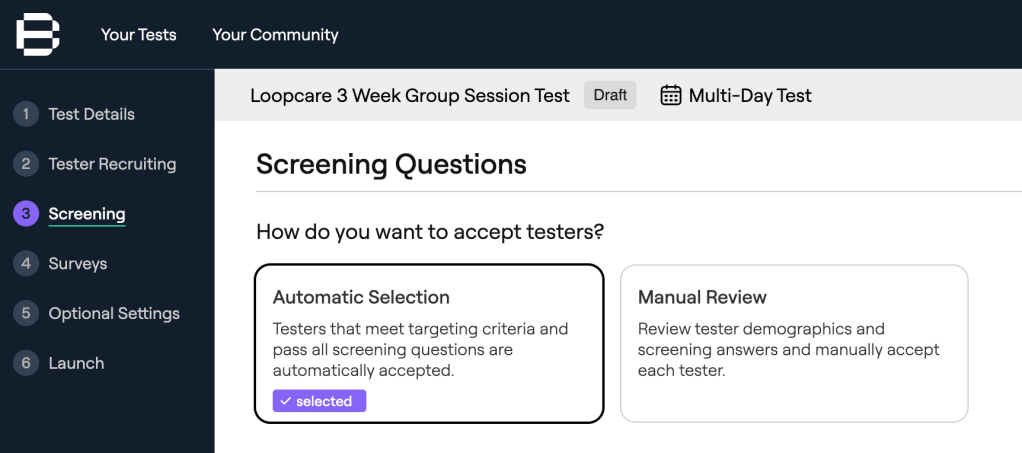
- Automatic Screening: Testers who meet all your predefined criteria are automatically accepted into the test, expediting the recruitment process.
- Manual Review: Provides the flexibility to handpick testers based on their responses to screening questions, demographic information, and device details.
This dual approach ensures that you can efficiently recruit testers who align with your specific requirements.
Managing Large Groups of Testers with Ease
Handling a sizable group of testers is streamlined through BetaTesting’s intuitive dashboard. The platform allows you to:

- Monitor tester participation in real-time.
- Send broadcast messages or individual communications to testers.
- Assign tasks and surveys with specific deadlines.
These tools enable you to maintain engagement, provide timely updates, and ensure that testers stay on track throughout the testing period.
Centralized Collection of Bugs and Feedback
Collecting and managing feedback is crucial for iterative development. BetaTesting consolidates all tester input in one place, including:
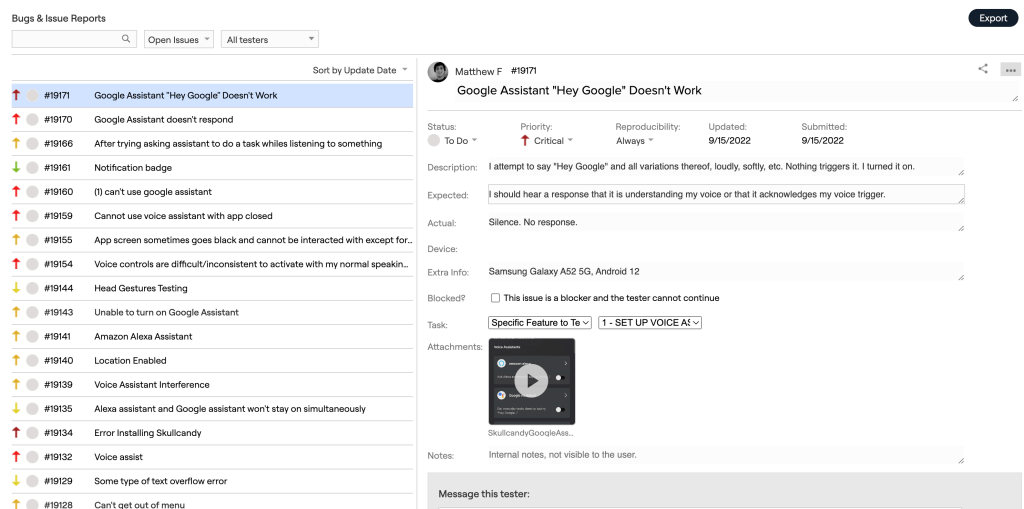
- Survey responses
- Bug reports
- Usability videos
This centralized system facilitates easier analysis and quicker implementation of improvements.
By leveraging BetaTesting’s comprehensive tools, you can automate and scale your beta testing process, leading to more efficient product development cycles.
Conclusion
Managing beta testers isn’t just about collecting bug reports, it’s about building a collaborative bridge between your team and the people your product is meant to serve. From setting clear expectations to closing the feedback loop, each part of the process plays a role in shaping not just your launch, but the long-term trust you build with users.
Whether you’re coordinating with a small group of power users or scaling a global beta program, smooth collaboration is what turns feedback into real progress. Clear communication, the right tools, and genuine engagement don’t just make your testers more effective – they make your product better.
Have questions? Book a call in our call calendar.
-
BetaTesting Named a Leader by G2 in Spring 2025

BetaTesting awards in 2025:





BetaTesting.com was recently named a beta testing and crowd testing Leader by G2 in the 2025 Spring reports and 2024 Winter reports. Here are our various rewards and recognition by G2:
- Grid Leader for Crowd Testing tools
- The only company considered a Grid Leader for Small Business Crowd Testing tools
- High Performer in Software Testing tools
- High Performer in Small Business Software Testing Tools
- Users Love Us
As of May 2025, BetaTesting is rated 4.7 / 5 on G2 and a Grid Leader.
About G2
G2 is a peer-to-peer review site and software marketplace that helps businesses discover, review, and manage software solutions
G2 Rating Methodology
The G2 Grid reflects the collective insights of real software users, not the opinion of a single analyst. G2 evaluates products in this category using an algorithm that incorporates both user-submitted reviews and data from third-party sources. For technology buyers, the Grid serves as a helpful guide to quickly identify top-performing products and connect with peers who have relevant experience. For vendors, media, investors, and analysts, it offers valuable benchmarks for comparing products and analyzing market trends.
Products in the Leader quadrant in the Grid® Report are rated highly by G2 users and have substantial Satisfaction and Market Presence scores.
Have questions? Book a call in our call calendar.
-
Does a Beta Tester Get Paid?

Beta testing is a critical step in the development of software, hardware, games, and consumer products, but do beta testers get paid?
First, a quick intro to beta testing: Beta testing involves putting a functional product or new feature into the hands of real people, often before official release, to see how a product performs in real-world environments. Participants provide feedback on usability, functionality, and any issues they encounter, helping teams identify bugs and improve the user experience. While beta testing is essential for ensuring quality and aligning with user expectations, whether beta testers get paid varies widely based on the product, the company, and the structure of the testing program.
Here’s what we will explore:
- Compensation for Beta Testers
- Factors Influencing Compensation
- Alternative Types of Compensation – Gift cards, early access, and more
Compensation for Beta Testers

In quality beta testing programs, beta testers are almost always incentivized and rewarded for their participation, but this does not always include monetary compensation. Some beta testers are paid, while others participate voluntarily or in exchange for other incentives (e.g. gift cards, discounts, early access, etc). The decision to compensate testers often depends on the company’s goals, policies, the complexity of the testing required, and the target user base.
Paid Beta Testing
Several platforms and companies, including BetaTesting offer paid beta testing opportunities for beta testers. These platforms often require testers to complete specific tasks, such as filling out surveys, reporting bugs, or providing high quality feedback to qualify for compensation.
Here is what we communicate on our beta tester signup page:
“A common incentive for a test that takes 45-60 minutes is $15-$30. In general, tests that are shorter have lower rewards and tests that are complex, difficult, and take place over weeks or months have larger rewards”
Check it out:
We have a full article on Giving Incentives for Beta Testing & User Research
Volunteer-Based Beta Testing
Not all beta testing opportunities come with monetary compensation. Some companies rely on volunteers who are solely interested in getting early access to products or contributing to their development.
In such cases, testers are only motivated to participate for the experience itself, early access, or the opportunity to influence the product’s development.
For example, the Human Computation Institute’s Beta Catchers program encourages volunteers to participate in Alzheimer’s research by playing a citizen science game:
“Join our Beta-test (no pun intended) by playing our new citizen science game to speed up Alzheimer’s research.” – Human Computation Institute
While the primary motivation is contributing to scientific research, the program also offers non-monetary incentives to participants such as Amazon gift cards.
Salaried Roles Involved in Beta Testing and User Research
Do you want a full-time gig related to beta testing?
There are many roles within startups and larger companies that are involved in managing beta testing and user research processes. Two prominent roles include Quality Assurance (QA) Testers and User Researchers.
QA teams conduct structured tests against known acceptance criteria to validate functionality, uncover bugs, and ensure the beta version meets baseline quality standards. Their participation helps ensure that external testers aren’t exposed to critical issues that could derail the test or reflect poorly on the brand.
User Researchers, on the other hand, bring a behavioral and UX-focused perspective to beta testing. They may run early unmoderated or moderated usability sessions to collect feedback and understand how real users interpret features, navigate workflows, or hit stumbling blocks.
These salaried roles are critical because they interface directly with users and customers and view feedback from the vantage point of the company’s strategic goals and product-market fit. Before testing, QA teams and User Researchers ensure that the product is aligned with user needs and wants, polished, and worthy of testing in the first place. Then, these roles analyze results, help to make recommendations to improve the product, and continue with iterative testing. Together, external beta testers and a company’s internal testing and research roles create a powerful feedback loop that supports both product quality and user-centric design.
Do you want to learn more how those roles impact beta testing? We have a full article on Who Performs Beta Testing?
Factors Influencing Compensation
Whether beta testers are compensated – and to what extent depends on several key factors. Understanding these considerations can help companies design fair, effective, and budget-conscious beta programs.
Nature of the product – products that are complex, technical, or require specific domain knowledge typically necessitate compensating testers. When specialized skills or industry experience are needed to provide meaningful feedback, financial incentives are often used to attract qualified participants.
Company policies – different companies have different philosophies when it comes to compensation. Some organizations consistently offer monetary rewards or incentives as part of their user research strategy, while others rely more on intrinsic motivators like product interest or early access. The company’s policy on tester compensation is often shaped by budget, brand values, and the strategic importance of feedback in the product lifecycle.
Testing requirements – the scope and demands of a beta test directly influence the need for compensation. Tests that require more time, include multiple tasks, involve detailed reporting, or span several days or weeks often call for some form of financial reward. The more demanding the testing, the greater the need to fairly recognize the tester’s effort.
Target audience – when a beta test targets a specific or hard-to-reach group, such as users in a particular profession, lifestyle segment, or geographic region – compensation can be a crucial incentive for participation. The more narrow or exclusive the target audience, the more likely compensation will be required to ensure proper engagement and reliable data.
Check it out: We have a full article on The Psychology of Beta Testers: What Drives Participation?
Alternative Types of Compensation – Gift cards, early access, and more.

Not all beta testing programs include direct monetary compensation – and that’s okay. Many companies successfully engage testers through alternative incentives that are often just as motivating. These non-cash rewards can be valuable tools for encouraging participation, showing appreciation, and creating a positive tester experience.
Gift cards – are a flexible and widely accepted form of appreciation. They offer testers a tangible reward without the administrative overhead of direct payments. Because they can be used across a range of retailers or services, gift cards serve as a universal “thank you” that feels personal and useful to a diverse group of testers.
Company products – allowing testers to keep the product they’ve tested, or providing them with company-branded merchandise, can be a meaningful way to express gratitude. This not only reinforces goodwill but can also deepen the tester’s connection with the brand. When testers receive something physical for their effort – especially something aligned with the product itself – it helps make the experience feel more rewarding.
Exclusive access – early or limited access to features, updates, or new products appeals to users who are eager to be part of the innovation process. Many testers are driven by curiosity and the excitement of being “first.” Offering exclusive access taps into that mindset and can be a powerful motivator. It also creates a sense of inclusion and privilege, which enhances the overall engagement of the testing group.
Recognition – acknowledging testers publicly or privately can have a surprisingly strong impact. A simple thank-you message, contributor credits, or inclusion in release notes helps testers feel that their feedback was not only heard but valued. Recognition builds loyalty, encourages future participation, and transforms one-time testers into long-term advocates.
Other non-monetary rewards – incentives can also include discounts, access to premium features, charitable donations made on the tester’s behalf, or exclusive community status. These options can be customized to fit the company’s brand and the nature of the product, offering a way to show appreciation that aligns with both the user base and the organization’s values.
Conclusion
When it comes to compensation, there’s no one-size-fits-all model. Some companies choose to pay testers for their time and feedback, especially when the testing is complex or highly targeted. Others rely on non-monetary incentives – like early access, gift cards, product perks, or public recognition that can be equally valuable when thoughtfully implemented.
The key is alignment: your approach to compensating testers should reflect your product’s complexity, your target audience, and the kind of commitment you’re asking for. By designing a beta program that respects participants’ time and motivates meaningful feedback, you’ll not only build a better product – you’ll also foster a community of loyal, engaged users who feel truly invested in your success.
Interested in using the BetaTesting platform? Book a call in our call calendar.
-
Who is Beta Testing For?

Beta testing is critical to the software development and release process to help companies test their product and get feedback. Through beta testing, companies can get invaluable insights into a product’s performance, usability, and market fit before pushing new products and features into the market.
Who is beta testing for? Let’s explore this in depth, supported by real-world examples.
Who is beta testing for?
- What types of companies is beta testing for?
- What job functions play a role in beta testing?
- Who are the beta testers?
For Startups: Building & launching your first product
Startups benefit immensely from beta testing as the process helps to validate product value and reduces market risk before spending more money on marketing.
The beta testing phase is often the first time a product is exposed to real users outside the company, making the feedback crucial for improving the product, adjusting messaging and positioning, and refining feature sets and onboarding.
These early users help catch critical bugs, test feature usability, and evaluate whether the product’s core value proposition resonates. For resource-constrained teams, this phase can save months of misguided development.
What is the strategy?
Early testing helps startups fine-tune product features based on real user feedback, ensuring a more successful product. Startups should create small, focused beta cohorts, encourage active feedback through guided tasks, and iterate rapidly based on user input to validate product-market fit before broader deployment.
For Established Companies: Launching new products, features, and updates.
Established companies use beta testing to ensure product quality, minimize risk, and capture user input at scale. Larger organizations often manage structured beta programs across multiple markets and personas.
With thousands of users and complex features, beta testing helps these companies test performance under load, validate that feature enhancements don’t cause regressions, and surface overlooked edge cases.
What is the strategy?
Structured beta programs ensure that even complex, mature products evolve based on customer needs. Enterprises should invest in scalable feedback management systems, segment testers by persona or use case, and maintain clear lines of communication to maximize the relevance and actionability of collected insights.
For Products Targeting Niche Consumers and Professionals
Beta testing is particularly important for companies targeting niche audiences where testing requires participants that match specific conditions or the product needs to meet unique standards, workflows, or regulations. Unlike general-purpose apps, these products often face requirements that can’t be tested without targeting the right people, including:
Consumers can be targeted based on demographics, devices, locations, lifestyle, interest, and more.
Professionals in fields like architecture, finance, or healthcare provide domain-specific feedback that’s not only valuable, it’s essential to ensure the product fits within real-world practices and systems.
What is the strategy?
Select testers that match your target audience or have direct, relevant experience to gather precise, actionable insights. It’s important to test in real-world conditions with real people to ensure that feedback is grounded in authentic user experiences.
For Continuous Improvement

Beta testing isn’t limited to new product launches.
In 2025, most companies operate in a continuous improvement environment, constantly improving their product and launching updates based on customer feedback. Regular beta testing is essential to test products in real world environments to eliminate bugs and technical issues and improve the user experience.
Ongoing beta programs keep product teams closely aligned with their users and help prevent negative surprises during public rollouts.
What is the strategy?
Reward testers and keep them engaged to maintain a vibrant feedback loop for ongoing product iterations. Companies should establish recurring beta programs (e.g., for new features or seasonal updates), maintain a “VIP” tester community, and provide tangible incentives linked to participation and quality of feedback.
What Job Functions Play a Role in Beta Testing?

Beta testing is not just a final checkbox in the development cycle, it’s a collaborative effort that touches multiple departments across an organization. Each team brings a unique perspective and set of goals to the table, and understanding their roles can help make your beta test smarter, more efficient, and more impactful.
Before we dive in:
Don’t miss our full article on Who Performs Beta Testing?
Product and User Research Team
Product managers and UX researchers are often the driving force behind beta testing. They use beta programs to validate product-market fit, identify usability issues, and gather qualitative and quantitative feedback directly from end users. For these teams, beta testing is a high-leverage opportunity to uncover real-world friction points, prioritize feature enhancements, and refine the user experience before scaling.
How they do that?
By being responsible for defining beta objectives, selecting cohorts, drafting user surveys, and synthesizing feedback into actionable product improvements. Their focus is not just “Does it work?”, it’s “Does it deliver real value to real people?”
Engineering Teams and QA
Engineers and quality assurance (QA) specialists rely on beta testing to identify bugs and performance issues that aren’t always caught in staging environments. This includes device compatibility, unusual edge cases, or stress scenarios that only emerge under real-world conditions.
How they do that?
By using the beta testing to validate code stability, monitor logs and error reports, and replicate reported issues. Feedback from testers often leads to final code fixes, infrastructure adjustments, or prioritization of unresolved edge cases before launch. Beta feedback also informs regression testing and helps catch the last mile of bugs that could derail a public release.
Marketing Teams
For marketing, beta testing is a chance to generate early buzz, build a community of advocates, and gather positioning insights. Beta users are often the product’s earliest superfans, they provide testimonials, share social proof, and help shape the messaging that will resonate at launch.
How they do that?
By creating sign-up campaigns, managing tester communication, and track sentiment and engagement metrics throughout the test. They also use beta data to fine-tune go-to-market strategies, landing pages, and feature highlight reels. In short: beta testing isn’t just about validation, it’s about momentum.
Data & AI Teams
If your product includes analytics, machine learning, or AI features, beta testing is essential to ensure data flows correctly and models perform well in real-world conditions. These teams use beta testing to validate that telemetry is being captured accurately, user inputs are feeding the right systems, and the outputs are meaningful.
How they do that?
By running A/B experiments, testing model performance across user segments, or stress-test algorithms against diverse behaviors that would be impossible to simulate in-house. For AI teams, beta feedback also reveals whether the model’s outputs are actually useful, or if they’re missing the mark due to training gaps or UX mismatches.
Who are the beta testers?
Many companies start alpha and beta testing with internal teams. Whether it’s developers, QA analysts, or team members in dogfooding programs, internal testing is the first resources to find bugs and address usability issues.
QA teams and staff testers play a vital role in ensuring the product meets quality standards and functions as intended. Internal testers work closely with the product and can test with deep context and technical understanding before broader external exposure.
After testing internally, many companies then move on to recruit targeted users from crowdsourced testing platforms like BetaTesting, industry professionals, customers, and power users / early adopters and advocates.
Dive in and to read more about “Who performs beta testing?”
Conclusion
Beta testing isn’t a phase reserved for startups and it isn’t a one time thing. It is a universal practice that empowers teams across industries, company sizes, and product stages. Whether you’re validating an MVP or refining an enterprise feature, beta testing offers a direct line to the people who matter most: your users.
Understanding who benefits from beta testing allows teams to design more relevant, impactful programs that lead to better products, and happier customers.
Beta testers themselves come from all walks of life. Whether it’s internal staff dogfooding the product, loyal customers eager to contribute, or industry professionals offering domain-specific insights, the diversity of testers enriches the feedback you receive and helps you build something truly usable.
The most effective beta programs are those that are intentionally designed, matching the right testers to the right goals, engaging stakeholders across the organization, and closing the loop on feedback. When done right, beta testing becomes not just a phase, but a competitive advantage.
So, who is beta testing for? Everyone who touches your product, and everyone it’s built for.
Have questions? Book a call in our call calendar.
-
Who Performs Beta Testing?

When people think of beta testing, the first image that often comes to mind is a tech-savvy early adopter tinkering with a new app before anyone else. But in reality, the community of beta testers is much broader – and beta testing is more strategic. From internal QA teams to global crowdsourced communities, beta testers come in all forms, and each plays a vital role in validating and improving digital products.
Here’s who performs beta testing:
- QA Teams and Internal Staff
- Crowdsourced Tester Platforms
- Industry Professionals and Subject Matter Experts
- Customers, Power Users, and Early Adopters
- Advocate Communities and Long-Term Testers
QA Teams and Internal Staff
Many companies start beta testing with internal teams. Whether it’s developers, QA analysts, or team members in dogfooding programs, internal testing is the first line of defense against bugs and usability issues.
Why they’re important? QA teams and staff testers play a vital role in ensuring the product meets quality standards and functions as intended. Internal testers work closely with the product and can test with deep context and technical understanding before broader external exposure.
How to use them?
Schedule internal test sprints at key stages—before alpha, during new feature rollouts, and in the final phase before public release. Use structured reporting tools to capture insights that align with sprint planning and bug triage processes.
Crowdsourced Testing Platforms

For broader testing at scale, many companies turn to platforms that specialize in curated, on-demand tester communities. These platforms give you access to real users from different demographics, devices, and environments.
We at BetaTesting with our global community of over 450,000 real-world users can help you collect feedback from your target audience.
Why they matter? Crowdsourced testing is scalable, fast, and representative. You can match testers to your niche and get rapid insights from real people using your product in real-life conditions—on real devices, networks, and geographies.
How to use them?
Use crowdsourced platforms when you need real world testing and feedback in real environments. This is especially useful for customer experience feedback (e.g. real-world user journeys), compatibility testing, bug testing and QA, user validation, and marketing/positioning feedback. These testers are often compensated and motivated to provide structured, valuable insights.
Check it out: We have a full article on The Psychology of Beta Testers: What Drives Participation?
Industry Professionals and Subject Matter Experts
Some products are designed for specialized users—doctors, designers, accountants, or engineers—and their feedback can’t be substituted by general audiences.
Why they matter? Subject matter experts (SMEs) bring domain-specific knowledge, context, and expectations that general testers might miss. Their feedback ensures compliance, industry relevance, and credibility.
How to use them?
Recruit SMEs for closed beta tests or advisory groups. Provide them early access to features and white-glove support to maximize the depth of feedback. Document qualitative insights with contextual examples for your product and engineering teams.
Customers, Power Users, and Early Adopters
When it comes to consumer-facing apps, some of the most valuable feedback comes from loyal customers and excited early adopters. These users voluntarily sign up to preview new features and are often active in communities like Product Hunt, Discord, or subreddit forums.
Why they matter? They provide unfiltered, honest opinions and often serve as evangelists if they feel heard and appreciated. Their input can shape roadmap priorities, influence design decisions, and guide feature improvements.
How to use them?
Create signup forms for early access programs, set up private Slack or Discord groups, and offer product swag or shoutouts as incentives. Encourage testers to share detailed bug reports or screencasts, and close the loop by communicating how their feedback made an impact.
Advocate Communities and Long-Term Testers

Some companies maintain a standing beta group—often made up of power users who get early access to features in exchange for consistent feedback.
Why they matter? These testers are already invested in your product. Their long-term engagement gives you continuity across testing cycles and ensures that changes are evaluated in real-world, evolving environments.
How to use them?
Build loyalty and trust with your core community. Give them early access, exclusive updates, and recognition in release notes or newsletters. Treat them as advisors—not just testers.
Conclusion
Beta testing isn’t just for one type of user—it’s a mosaic of feedback sources, each playing a unique and important role. QA teams provide foundational insights, crowdsourced platforms scale your reach, SMEs keep your product credible, customers help refine usability, and loyal advocates bring long-term consistency.
Whether you’re launching your first MVP or refining a global platform, understanding who performs beta testing—and how to engage each group—is essential to delivering a successful product.
View the latest posts on the BetaTesting blog:
- How Many Beta Testers Do You Need? A Data-Backed Guide for Beta Testing
- Top Beta Testing Mistakes Teams Make (And How to Avoid Them)
- How to Create a Beta Test Plan: Step-by-Step Guide for Product & QA Teams
- What Is the Purpose of Beta Testing?
- What Happens During Beta Testing?
Interested in BetaTesting? Book a call in our call calendar.

 BetaTesting Blog